
OIVO PS5 Controller Charger Station
4.7Editor score
Charges two compatible controllers
Nine touch-controlled RGB modes
Clear charging status indicators
Our guide compares the best PS5 accessories for kids, covering charging stations, cooling stands, grips, skins, stickers, and gaming headsets.
The right PS5 accessories can make a child's gaming setup more organized, comfortable, and easier to use. Useful charging docks reduce cable clutter, cooling stands keep the console area tidy, and controller grips can improve comfort during longer sessions. The best choices also match a child's controller and console model.
We compared ten accessories based on the supplied compatibility information, feature details, customer ratings, and intended gaming functions. The list covers charging stations, cooling stands, trigger extenders, console and controller skins, logo decals, and a gaming headset. Every recommendation is selected for a particular age, preference, or setup rather than for decoration alone.
Each pick reveals what it does best: one offers a compact charging solution, another combines cooling with charging, and others focus on grip, personalization, or communication. Ratings and product details reflect the information available for this guide, while prices and availability can change. Always confirm compatibility before making a purchase.
4.7Editor score

4.7Editor score

4.4Editor score
The table compares all ten picks by their primary function, compatibility, convenience, and child-friendly benefits, making it easier to identify the right accessory for a particular PS5 setup.


This multi-function station combines a vertical console stand, cooling fan, controller charging area, USB hub, and media remote storage. Its supplied rating is 4.4 out of 5, placing it among the stronger all-in-one choices, although its feature set is more elaborate than that of a dedicated charging dock. It is designed for PS5, PS5 Slim, and PS5 Pro consoles.
We may earn a commission when you buy through this link, at no additional cost to you.
The main advantage is consolidation. A child can keep the console upright, charge an original DualSense or Edge controller, connect additional USB devices through three side ports, and store the media remote in a dedicated slot. The adjustable charging port accommodates both supported controller styles. According to the product information, the original controller reaches a full charge in about 3.5 hours, while the Edge controller takes approximately 2.5 hours.
Cooling is handled by a high-efficiency fan with three manually adjustable levels and an automatic mode. The supplied description also identifies protection against overcharging, overcurrent, and excessive temperature. These safeguards are useful for a shared family setup because the station can remain connected while the console is used regularly. The concealed cables and security screws help create a stable, tidy installation.
This is the strongest premium pick when a family wants to organize more than charging cables. It may be excessive for a child with only one console and one controller, but it is particularly useful for shared spaces, multiple players, and setups where the media remote and extra USB devices need dedicated places. Confirm the exact console fit and read the installation instructions before mounting the console.
Combining the vertical stand, charging function, USB hub, and media remote slot reduces the number of separate objects around the console. That makes the setup easier for children to manage independently and leaves more open space on a desk or entertainment unit.
The movable charging port accommodates both PS5 original and Edge controllers. Separate red and green indicator behavior helps show charging and standby status, while the automatic charging controls are intended to reduce overcharging risk.
We may earn a commission when you buy through this link, at no additional cost to you.
The OIVO station is a straightforward charging dock for two PS5 controllers, with a supplied rating of 4.7 out of 5. It supports both DualSense and Edge controllers and is designed to recharge them simultaneously. Its appeal comes from doing one job clearly and compactly rather than adding cooling, storage, or media remote functions.
We may earn a commission when you buy through this link, at no additional cost to you.
The dock connects through a 34.8-inch USB cable to a PS5 console, original AC adapter, laptop, or another suitable USB power source. The supplied information states that two supported controllers can reach a full charge in about two hours. Protective circuitry is listed for overcurrent, overvoltage, and short-circuit conditions, making the dock a practical overnight charging option when used as directed.
Nine dynamic RGB modes offer a more decorative experience for a child's gaming room. Touch controls switch between fast flashing, slow flashing, and single-color lighting, while a long press turns the lights off. The dock also uses non-slip pads to remain stable, and red and green LEDs indicate charging and full-charge or standby states.
This is the best pick for families seeking a small, understandable charging accessory for one or two children. It keeps controllers organized and makes charging as easy as placing them on the dock. The trade-off is that it does not cool the console or provide USB ports. Children should place only supported controllers on it and connect the cable to an appropriate power source.
The drop-to-charge format removes the need to handle charging cables every time a child finishes playing. Two charging positions make it suitable for siblings, regular players, or keeping a spare controller ready.
RGB lighting adds personality to a gaming room while remaining optional. Users can select several animated or single-color modes or turn the illumination off when a calmer appearance is preferred.
We may earn a commission when you buy through this link, at no additional cost to you.
The NEWDERY station is a dual controller dock with a supplied rating of 4.7 out of 5. It supports both DualSense and Edge controllers, charging two at the same time. Its four slots and four anti-slip mats help keep each controller properly positioned, which is especially useful for children who may place controllers down without much care.
We may earn a commission when you buy through this link, at no additional cost to you.
A blue flashing light indicates charging, while a steady light represents a full charge or standby state. The product information states that supported controllers can charge fully within about two and a half hours. The package includes the dock, a 3.3-foot Type-C cable, and a user manual, so buyers should verify whether a compatible wall adapter is already available.
The important operational detail is that controller skins or cases should be removed before charging. The listing also recommends using a 5V/3A adapter. These instructions are sensible points to check before purchase, particularly in a family with several controller covers. The dock itself offers fewer decorative features than the OIVO option, making it visually and functionally focused.
This is the best balanced pick for a child who regularly uses more than one controller or wants one dock for both DualSense and Edge hardware. It delivers the essential functions without relying on RGB lighting or an automatic fan. Verify controller fit, remove any protective skin before charging, and use a power source that meets the stated requirements.
Four anti-slip mats reduce controller movement while charging. That creates a more predictable dock experience for children and helps keep the charging contacts properly aligned.
Supporting both DualSense and Edge controllers means families do not need separate docks when they use different models. The four charging slots accept the two included positions while helping keep each controller secure.
We may earn a commission when you buy through this link, at no additional cost to you.
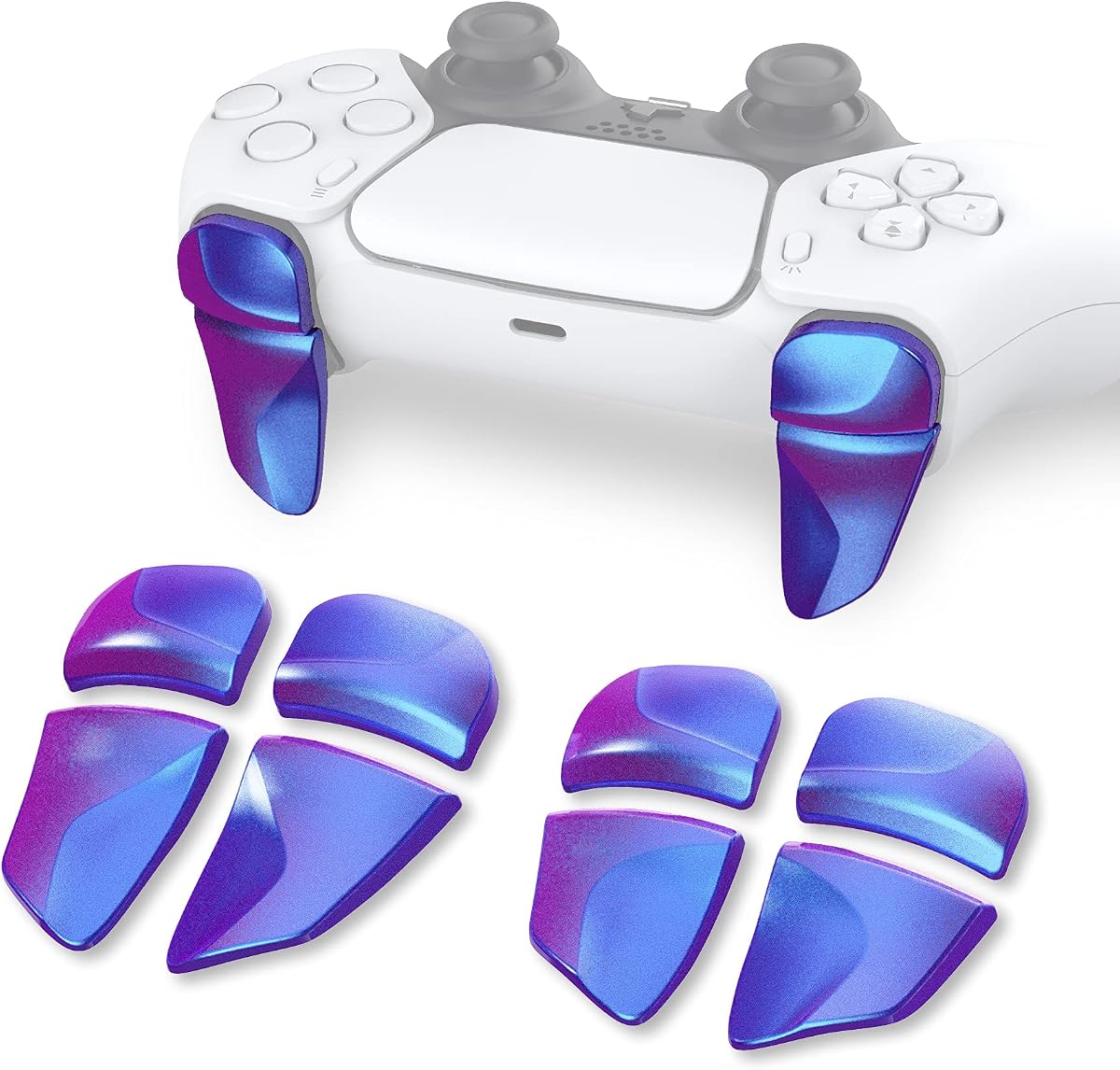
The PlayVital Blade 2 set adds adjustable extensions to the shoulder buttons and triggers of a PS5 controller. It is compatible with the standard PS5 controller, PS5 Edge controller, and PS Portal Remote Player. The supplied rating is 4.4 out of 5, and its strongest child-focused benefit is improved reach for players who find the original triggers difficult to operate.
We may earn a commission when you buy through this link, at no additional cost to you.
The package includes two pairs of L1/R1 bumper extensions and L2/R2 trigger extensions. The L1/R1 pieces come in two thicknesses, while the L2/R2 pieces offer two lengths. This gives young players a way to select a configuration that better matches their fingers rather than forcing one fixed shape on everyone.
Installation uses adhesive stickers, and the extensions are designed to click firmly into place. The process is more involved than clipping on a standard accessory, and the listing suggests searching for the PlayVital installation video on YouTube. Families should ensure the adhesive is placed carefully and that the controller surface is clean before attachment.
This is a worthwhile option for a child with larger hands, limited finger reach, or difficulty pressing shoulder buttons comfortably during action games. It is less necessary for a player who already operates the standard triggers easily. Because the fit is personal, check dimensions against the child's hands and confirm compatibility with the specific controller being used.
The adjustable extensions give children a larger target for L1, R1, L2, and R2 inputs. This can make shooting, racing, and other games easier to control when the standard buttons are difficult to reach.
Different thicknesses and lengths allow the fit to be adjusted rather than making every player use one extension style. Trying the alternatives with different games can help identify the most comfortable configuration.
We may earn a commission when you buy through this link, at no additional cost to you.
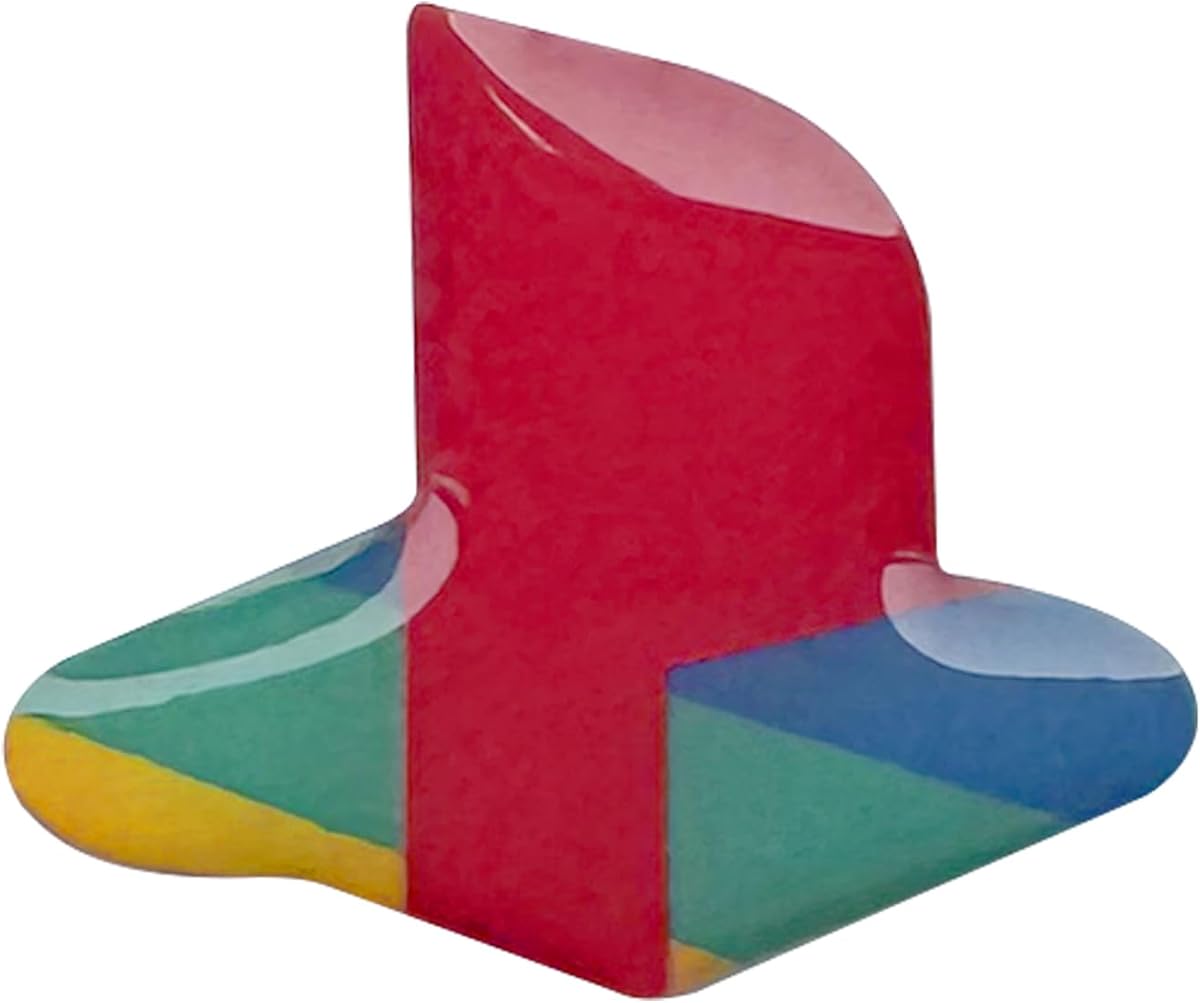
These underlay decals personalize a PS5 Slim or PS5 Pro with a classic retro-inspired PS logo and color treatment. The supplied rating is 4.7 out of 5. They are intended for the Disc and Digital editions of PS5 Slim, as well as PS5 Pro, and the package includes console decals plus a DualSense controller logo sticker.
We may earn a commission when you buy through this link, at no additional cost to you.
The domed shape is intended to resemble a raised button once applied. According to the product information, the vinyl stickers adhere securely while remaining removable without leaving sticky residue. That makes this a relatively low-commitment way for a child to personalize a gaming area, especially compared with a permanent color change.
Installation requires following the included instructions and applying each decal to a clean surface. Because these are cosmetic pieces, careful alignment matters more than technical complexity. The title describes two packs of console underlays and one controller logo sticker pack, giving a family options for coordinating the console and controller.
This accessory is best for a child who enjoys making a gaming setup look distinctive but does not need added functionality. It is also useful for distinguishing a shared console from another system in the same room. Confirm the console model before ordering, because the fit applies specifically to PS5 Slim and PS5 Pro rather than the original PS5.
Removable vinyl gives children a chance to change the appearance of a console without permanently modifying it. The stated removable design also makes the decals easier to reposition or replace as preferences change.
Applying console and controller decals together creates a more consistent visual theme. That gives a child ownership over the gaming space while leaving the core hardware unchanged.
We may earn a commission when you buy through this link, at no additional cost to you.
The Blue Fire vinyl skin gives a PS5 Digital Edition console and its controllers a colorful full-body appearance. Its supplied rating is 3.8 out of 5, which is lower than the ratings of the other products in this guide, so buyers should consider the visual design, fit, and installation process carefully before choosing it.
We may earn a commission when you buy through this link, at no additional cost to you.
The skin is made from printed vinyl and is described as helping protect the console from scratches and dust. It covers more of the console than a small logo decal, creating a dramatic transformation. Controller skin sections are also included, allowing the console and controllers to share a coordinated appearance.
The listing describes installation as a straightforward stick, clean, and remove process and states that the material can be removed without leaving sticky residue. As with any adhesive cover, the surface should be clean and dry before application. Taking time to align each section is important because the full-body design has more edges than a single logo decal.
This is a good match for a child with a Digital Edition console who wants a dramatic, colorful appearance. It is not suitable for a Disc Edition system based on the stated fit, and it offers no charging, cooling, or grip improvement. The lower supplied rating reinforces the importance of checking dimensions and product photos carefully before buying.
A full-body skin changes the look of the console rather than adding one small accent. A child who wants the gaming room to reflect a favorite color or theme may find the transformation more satisfying than a standard decal.
The vinyl layer can cover the console against minor scratches and dust while remaining removable. Proper cleaning and careful alignment help produce a neater result and make future style changes easier.
We may earn a commission when you buy through this link, at no additional cost to you.
The Red Black controller skin is a studded silicone cover designed specifically for the PS5 Edge controller. It comes with three pairs of thumb grip caps and has a supplied rating of 4.2 out of 5. Its primary benefit is grip, particularly for children whose hands become sweaty during longer gaming sessions.
We may earn a commission when you buy through this link, at no additional cost to you.
The silicone surface is described as anti-slip, sweat-resistant, and comfortable. Precisely cut openings preserve access to the controller's buttons, while the included thumb grips are intended to improve analog-stick accuracy and comfort. That combination gives the child both a more secure hold and a different feel around the sticks.
The cover also adds a protective layer against ordinary wear and marks. This can be useful for a frequently used controller, especially in a household where children share accessories. The studded texture may not feel comfortable to every player, so allowing a child to try it before a long session is sensible.
This is a strong option for a child using the PS5 Edge controller who values a secure grip and a bold appearance. It should not be chosen for a standard DualSense controller because the stated compatibility is limited to the Edge model. Install the skin carefully, fit the thumb grips properly, and confirm that all buttons remain easy to press.
The textured silicone surface helps reduce slipping when hands become damp. Greater control can be reassuring for younger players who may otherwise lose grip on the controller during fast action.
Three pairs of interchangeable caps let the player tune the stick feel. The added texture may make small directional adjustments feel more deliberate, although comfort will depend on personal preference.
We may earn a commission when you buy through this link, at no additional cost to you.
The Tatybo Gaming Headset combines surround-style audio, a flexible microphone, RGB lighting, and a lightweight frame for children, siblings, and family gaming. It has a supplied rating of 4.4 out of 5. Its 3.5mm connection allows it to be used with a PS5, PC, Switch, and other compatible devices with the appropriate jack.
We may earn a commission when you buy through this link, at no additional cost to you.
High-precision 50mm neodymium drivers provide the stated sound output, while the memory-protein earmuffs and elastic head pad are designed for longer sessions. The headset weighs less than eight ounces according to the product information, an important detail for younger players who may become uncomfortable with heavier headsets.
The 360-degree flexible microphone includes a mute control and is intended to provide clear chat communication with teammates. A braided cord, aluminum headband, and reinforced construction are listed for durability. The USB connection is only for the LED lighting; it does not carry audio, which is an important distinction when connecting the headset.
This headset is best for a child who participates in voice chat or wants a lightweight wired option across several devices. Parents should note that the product is not suitable for Xbox 360 and that older systems without a 3.5mm jack may require an adapter. Check the connection method before purchase and avoid pulling on the attached cable.
The adjustable microphone can be positioned near the mouth without requiring a large boom. Mute access gives children a quick way to control chat, while the flexible design supports different seating positions.
The lightweight frame and cushioned earmuffs reduce the burden of prolonged wear. A child who finds over-ear headphones uncomfortable may benefit from trying this headset during short sessions first.
We may earn a commission when you buy through this link, at no additional cost to you.
The White Anti-Slip Controller Skin is a studded silicone cover for the standard PS5 wireless controller, with a supplied rating of 4.6 out of 5. It is intended for children who want a more secure hold, extra protection, and a different texture around the grips and analog sticks.
We may earn a commission when you buy through this link, at no additional cost to you.
The package contains one white controller skin and four pairs of thumb grip caps. Its soft, thickened, studded design is described as anti-slip and sweat-resistant. Precisely cut access points allow the player to continue using the controller's buttons without obstruction, while the added caps are intended to improve analog-stick accuracy.
Beyond grip, the silicone layer provides basic protection from ordinary scuffs and wear. This makes it particularly useful for a controller that children handle frequently or pass between siblings. As with any fitted skin, installation will be most effective when the controller is clean and dry and each edge is aligned carefully.
This is a good choice for a child using the standard PS5 wireless controller rather than the Edge model. Its supplied rating is strong, and the generous selection of thumb grips allows the user to compare different cap shapes. Choose it for grip and personality, but confirm the standard controller fit before buying.
Studded silicone gives fingers and palms additional texture. That can help a child retain control during energetic games or when hands feel damp, without changing the underlying controller.
Four pairs of caps offer more variety than a small replacement set. Comparing the shapes can help a player choose a stick feel that feels precise and comfortable rather than merely different in appearance.
We may earn a commission when you buy through this link, at no additional cost to you.
The Automatic Cooling Charging Stand combines a vertical PS5 mount, temperature-responsive cooling fan, dual controller charger, headset holder, media remote slot, hard-drive slot, and game-card storage. Its supplied rating is 4.5 out of 5. It is particularly useful for a family gaming area where accessories and cables otherwise spread across the desk.
We may earn a commission when you buy through this link, at no additional cost to you.
Compatibility covers the original PS5, PS5 Slim, and PS5 Pro in Disc and Digital versions. A built-in sensor monitors console temperature and adjusts the fan across low, medium, and high speeds. The product information specifies thresholds from below 35°C through above 37°C, with a touchscreen also allowing manual control.
Three charging ports support controllers, a headset, and another device. The supplied Type-C cable can draw power from a wall outlet or the console's front port. Dual controller charging is claimed to take about two hours, with red and green LEDs showing status. Smart chips are described as stopping charging at 70% to reduce overcharging risk.
This is the most storage-oriented option in the list and works well for a shared family setup. The extra size and more involved installation may be unnecessary for a child who only uses one controller, but the organized storage and automatic cooling offer clear advantages for a dedicated gaming space. Confirm console compatibility, provide proper clearance around the fan, and follow the power instructions.
Temperature sensing allows the fan to run quietly at lower levels and increase airflow as the console heats. Manual three-speed controls remain available when a child or parent prefers direct adjustment.
Dedicated spaces for two controllers, a headset, media remote, hard drive, and game cards help keep a busy gaming area orderly. The vertical console position also uses desk space more efficiently.
We may earn a commission when you buy through this link, at no additional cost to you.
The best accessory depends on the child's controller model, available space, and the problem the family wants to solve. Compatibility, safe charging, easy installation, and age-appropriate comfort should take priority over decorative extras.
Start by identifying the exact hardware in the household. Some charging stations support both DualSense and Edge controllers, while the controller skins in this guide are limited to either the standard PS5 controller or the Edge model. The cooling stands are described as compatible with PS5, PS5 Slim, and PS5 Pro consoles, including Disc and Digital versions where specified. A sticker intended for PS5 Slim is not automatically suitable for the original console.
A dedicated dock is useful when controllers are regularly left on a desk or shared by multiple children. Look for simultaneous charging, clear red and green or blue status indicators, and protection against common charging faults. Pay attention to included cables and adapter requirements. The NEWDERY dock recommends a 5V/3A adapter, while the larger stations can draw power from the console or a suitable source. A child should never handle exposed wiring or use a dock with visible damage.
A cooling stand can direct air around the console while keeping it upright, but it should not block the console's ventilation openings. Automatic fan control is useful because it adjusts output as temperature changes, while manual controls offer more direct control. Follow the supplied instructions and leave the intended clearance around the console. A child should not be allowed to change wiring or remove safety screws without adult supervision.
Comfort accessories are highly personal. Silicone skins add texture, protect the shell, and can help with sweaty hands, while trigger extenders allow the L1, R1, L2, and R2 buttons to be reached more easily. Children with smaller hands may benefit from raised or adjusted triggers, but not every extension feels natural. Let the child try the accessory during a familiar game and remove it if it causes discomfort or interferes with button access.
Consider how much room remains around the TV and entertainment unit. A small two-controller dock needs little space, while a full cooling station may also include a headset holder, game-card storage, media remote slot, and hard-drive slot. Extra organization is helpful in a shared family room, but a large accessory can be excessive if the console sits in a compact cabinet. Measure the intended location and check the stand's footprint before purchasing.
Decals and vinyl skins let a child express ownership of the console without altering its hardware. Removable materials are preferable for shared systems because styles can change or the console can be resold. Clean and dry the surface before applying a decal, align edges carefully, and avoid covering ventilation areas. Children who enjoy changing their setup may prefer a small logo decal, while a child seeking a full visual transformation may prefer a complete skin.
A child-friendly headset should be light, comfortable, and compatible with the intended device. The Tatybo model uses a 3.5mm connection and states that its USB plug is only for lighting. It also notes that the headset is not suitable for Xbox 360 and may need an adapter for older PlayStation systems. Check the connection before purchasing, and test the microphone and volume at a safe level with a parent.
Older children can manage a simple drop-to-charge dock, while younger players benefit from clear indicators and non-slip surfaces. Larger cooling stations require more careful assembly and cable routing. Trigger extenders use adhesive installation, and skins require alignment, so adult help may be appropriate. Choose a product that matches the child's maturity as well as the family's setup and willingness to supervise setup.
Begin by confirming the accessory's compatibility and reading the included instructions. Clean and dry the controller or console surface before applying skins, grips, or decals. For a charging dock, connect the correct power source before placing controllers on it, and remove controller skins or cases when the manufacturer specifically instructs users to do so. Never force an unsupported controller into a charging slot.
Introduce charging stations gradually by explaining the status lights and what they mean. Teach children to place controllers squarely on the dock rather than pulling them off by the attached cable. For cooling stands, keep the fan unobstructed, secure the console with the supplied screws, and inspect the cable path for tension. Families should supervise children while connecting or disconnecting any stand with built-in power.
Care for grips, skins, and decals with light handling rather than harsh cleaning products. Remove a skin or decal if it lifts, wrinkles, or begins to interfere with buttons. Store the headset with its cable loosely coiled, and keep moisture away from the 3.5mm connector. Periodically inspect charging contacts, screws, adhesive pieces, and fan openings so that wear is addressed before accessories become unreliable.
A charging dock and a comfortable controller grip are often the most useful additions for regular play. Larger cooling stands help with console organization, while headphones and microphones benefit children who join online voice chat. Decals and skins add personality but do not improve performance, so families should prioritize function before decoration.
Some do, and some do not. The OIVO and NEWDERY docks listed here specifically support both DualSense and Edge controllers. The larger cooling stations also describe charging for both original and Edge controllers. Always verify the compatibility language for the exact product and controller model before ordering.
They can be suitable when installed and operated as directed. Look for secure console mounting, protected wiring, stable construction, and unobstructed ventilation. An adult should handle initial assembly and power connections, especially for younger children. The cooling fan should never be covered or modified.
A studded silicone controller skin can add texture and improve traction when hands become damp. Thumb grips may also make analog-stick inputs feel more controlled. The correct choice depends on whether the child uses the standard PS5 controller or Edge controller, because the two skins in this guide are not interchangeable.
Yes, if the original shoulder buttons are difficult to reach. The PlayVital extenders offer different thicknesses and lengths, allowing a child to choose a more comfortable position for L1, R1, L2, and R2 inputs. Installation uses adhesive, so adult assistance and careful placement are recommended.
They should not cover ventilation openings or alter the console's required airflow. Apply only the sections indicated by the manufacturer and check that no edges lift into vents. A skin that wrinkles, peels, or blocks a cooling path should be removed. Always follow the product-specific installation instructions.
A dedicated two-controller dock is generally simpler than a full cooling station. The OIVO model offers touch-controlled lighting and a long USB cable, while the NEWDERY model uses blue status lights and anti-slip mats. Both support DualSense and Edge controllers according to the supplied information, so the best choice comes down to lighting preference and power requirements.
The Tatybo headset in this guide uses a 3.5mm audio connection and is described as suitable for PS5, PC, Switch, and other compatible devices. Its USB connector powers the lighting only and does not carry audio. Compatibility depends on the device having a suitable jack or an available adapter.
The OIVO dock is the simplest budget-oriented choice for charging two controllers, while the NEWDERY dock offers a balanced alternative with strong supplied ratings, anti-slip support, and DualSense plus Edge compatibility. For families wanting one substantial hub, the RGB Cooling Charging Station combines cooling, charging, USB connectivity, and media remote storage in a single vertical setup.
Prioritize the accessory that solves the biggest problem in your gaming area. Choose a controller charger for cable clutter, a cooling stand for organization and temperature management, trigger extenders for reach, a silicone skin for grip, a headset for voice chat, or removable decals for personalization. Confirm the child's exact controller and console model before making a final choice.
Ratings, promotions, availability, and prices can change, so check the current listing before purchasing. Read recent customer feedback, review the included components, and verify power requirements and installation steps. With compatibility confirmed, the right accessory can make the child's PS5 experience safer, more comfortable, and easier to organize.