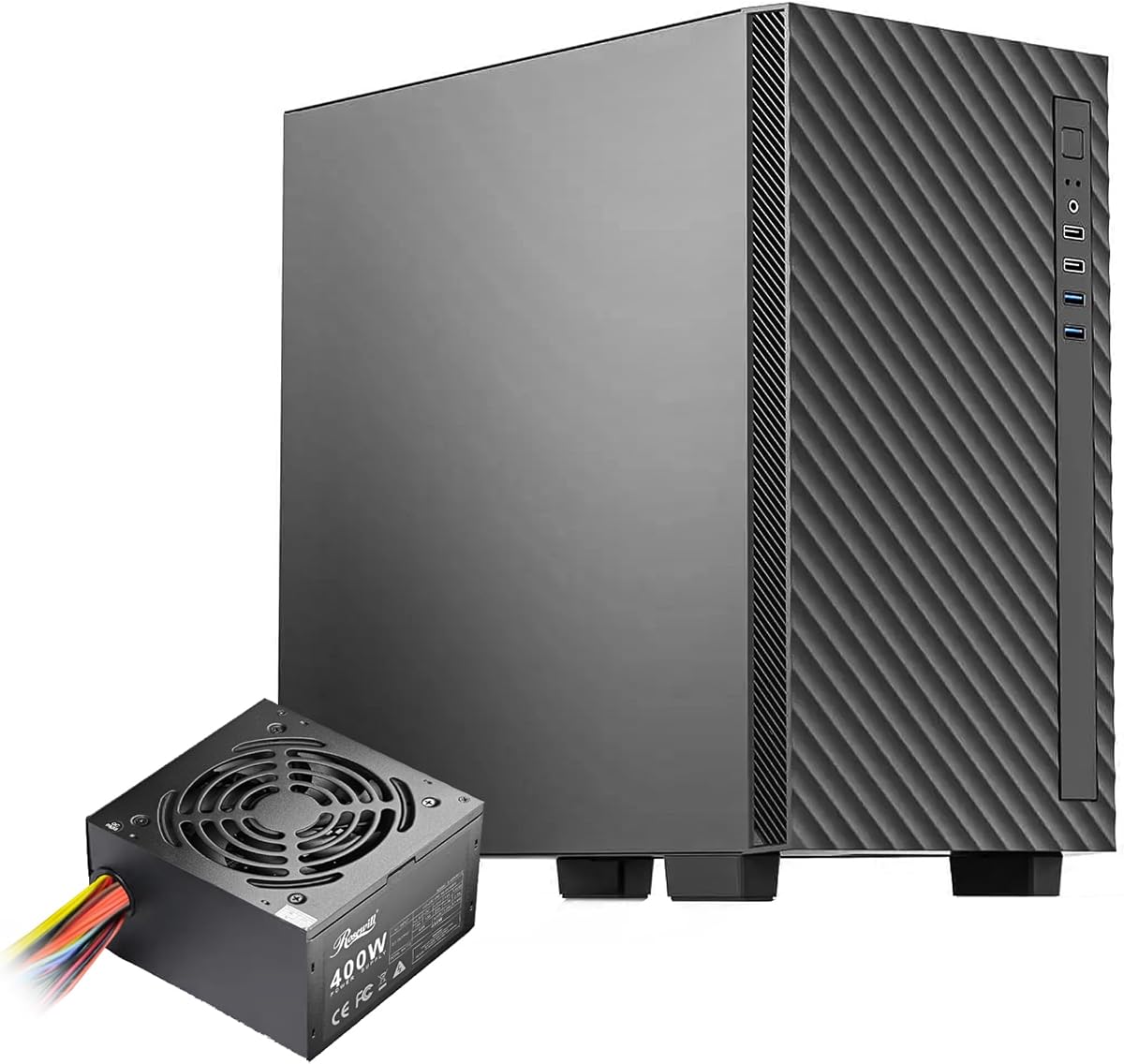
Rosewill FBM-X5
4.9Editor score
Pre-installed 400W power supply
Compact microATX and Mini-ITX support
Flexible air and radiator options
Our PC Case with PSU Combo guide compares airflow, power, cooling, clearance, compatibility, and included parts to help you choose a capable build.
A PC case with PSU combo can simplify a new build by pairing an enclosure with a compatible power supply, sometimes alongside a CPU cooler and fans. The best bundle balances usable capacity, clean airflow, practical connections, and dependable power without overlooking motherboard, graphics card, and cooler compatibility.
We compared the supplied cases and bundles using component fit, included power capacity, cooling provisions, fan configuration, front-panel connectivity, clearance, and visual design. The list covers full three-part gaming bundles as well as compact, mid-tower, and full-tower cases whose listings do not confirm an included power supply.
Each review explains what distinguishes the chassis or bundle, where it fits best, and which compatibility details deserve attention before purchase. Product ratings and configuration details can change over time, so compare the latest listing and current component requirements rather than relying on this guide alone.
4.9Editor score

4.7Editor score

4.0Editor score
The comparison below places capacity, power availability, cooling hardware, motherboard support, and graphics card clearance side by side. Only products whose supplied data explicitly confirms an included power supply should be treated as ready-to-pair power bundles; the remaining cases require separate verification.


The Raidmax i802 Vibe Series Bundle is a broad starter package for an ATX mid-tower gaming build, combining a tempered-glass chassis, a 700W 80+ power supply, five fixed-RGB fans, and an AM1204 CPU air cooler with a digital display. Its 4.0 rating reflects a product that offers an unusually complete set of core components, though buyers still need to confirm that every included part works with their selected hardware.
We may earn a commission when you buy through this link, at no additional cost to you.
The bundle is designed to reduce the number of separate purchases required for a first build. Five pre-installed FRGB fans provide immediate airflow and illumination without another fan order, while the 700W power supply supplies ample nominal capacity for many mainstream gaming configurations. The AM1204 cooler adds useful CPU temperature visibility, which can be especially helpful while learning how a new system responds to sustained workloads.
The i802 Vibe chassis itself uses an ATX mid-tower format and places visual emphasis on the components through a tool-less tempered-glass side panel. Available finishes include Vivid Blue, Green, Pink, and Purple, giving the bundle more personality than a conventional all-black starting point. Fixed RGB means the lighting is coordinated rather than independently controllable per zone, so enthusiasts who prioritize granular lighting effects may want a different approach.
This is most appropriate for a builder who wants the case, power supply, CPU cooler, and basic cooling in one coordinated purchase. It may suit a first gaming system or a themed color build, provided the AM1204 cooler, 700W unit, and motherboard support align with the processor and expansion hardware. Confirm socket compatibility and PSU dimensions before ordering, and consider adding a higher-tier CPU cooler if the processor is a sustained-load enthusiast chip.
The major advantage is coordination. Rather than selecting a chassis, power supply, and CPU cooler independently, the buyer receives a package intended to work together. That convenience can be especially valuable for a new builder who wants a coherent baseline while still having room to choose the motherboard, processor, memory, storage, and graphics card separately.
Five pre-installed FRGB fans and a display-equipped air cooler make this more than a basic case-and-power bundle. The display can provide a quick view of CPU temperature, while the case lighting creates an immediate finished appearance. Buyers should still check socket support and case clearance before assuming the supplied cooler can be used with their chosen processor.
We may earn a commission when you buy through this link, at no additional cost to you.
The Cooler Master HAF 500 Pro Bundle earns an Editor's Choice position because it combines a high-airflow ATX mid-tower with a 650W Gold power supply and the well-regarded Hyper 212 Halo CPU cooler. Its 4.7 rating reflects a balanced package in which cooling and visual presentation are handled by the same established ecosystem, making it a sensible centerpiece for a gaming PC.
We may earn a commission when you buy through this link, at no additional cost to you.
Cooling is the defining strength. The mesh front panel feeds two 200mm ARGB intake fans, a 120mm ARGB rear fan handles exhaust, and the rotatable 120mm graphics card fan can be aimed toward the card's most demanding section. The included Hyper 212 Halo adds a 120mm PWM ARGB CPU fan and supports AM4, AM5, LGA 1700, and LGA 1821 according to the supplied information, giving buyers meaningful processor-platform choice.
The bundle's 650W MWE Gold supply offers an efficient 80 Plus Gold platform with the durability and thermal resilience highlighted in the product information. It is a sound match for many mainstream gaming builds, but power-hungry processors and advanced graphics hardware can make wattage the deciding factor. A 410mm graphics card allowance and E-ATX support provide useful room, although the full physical dimensions should still be measured against the intended desk or cabinet.
This bundle is the strongest choice for a builder who values a ready-to-assemble foundation, effective airflow, and a coherent set of components. It is especially useful when the case, power supply, and CPU cooler would otherwise be selected from the same brand. Choose it when its 650W rating and case footprint suit the system; for heavily upgraded workstations or top-end gaming hardware, a larger power budget may be wiser.
The large 200mm front fans can move substantial air through the mesh panel, while the rear and adjustable graphics card fans provide targeted circulation. This arrangement is particularly useful for air-cooled systems because it feeds the intake side, removes rising heat, and directs additional airflow toward a frequently loaded graphics card.
The CPU cooler covers several current socket families, while the case supports E-ATX boards, multiple radiator sizes, USB 3.2 connectivity, and a Type-C front port. These details make the package adaptable, but exact motherboard dimensions, cooler mounting hardware, and the chosen graphics card should always be checked before assembly.
We may earn a commission when you buy through this link, at no additional cost to you.
The Micro-ATX Gaming PC Case Includes 650W Power Supply combines a compact mini-tower enclosure, a 650W power supply, and eight pre-installed ARGB fans. Its 3.9 rating places it behind the more highly rated alternatives, but the supplied feature set is substantial for builders who value a complete package, dense cooling, and a compact footprint.
We may earn a commission when you buy through this link, at no additional cost to you.
Its standout feature is the large fan count. The eight 120mm ARGB fans are designed to maintain a consistent speed of approximately 1200 RPM, providing steady airflow without the sudden speed changes associated with variable-speed fan curves. A dedicated 10-port ARGB hub gives the system a centralized lighting controller, and the dual tempered-glass panels create a panoramic view of the internal components.
The chassis measures 16.54 by 11.22 by 14.17 inches and supports Micro-ATX and Mini-ITX motherboards, not standard ATX boards. It accommodates graphics cards up to 400mm, CPU coolers up to 170mm, and power supplies up to 200mm. Top radiator support extends to 360mm, four horizontal expansion slots are provided, and a vertical graphics card mounting option adds installation flexibility.
The bundle is a good match for a smaller gaming system built around a compatible processor and graphics card. Its included 650W supply should be evaluated against the selected CPU and GPU, and the 3.9 rating suggests some buyers may have encountered fitment, noise, or other satisfaction concerns. Verify motherboard form factor, cooler height, and PSU length before purchase, particularly if a standard ATX board is already on your parts list.
Eight pre-installed 120mm fans create more visible cooling hardware than most bundles offer. Their fixed operating approach is intended to favor consistent airflow and reduced resonance, although builders who prefer fine fan-speed control may need to account for the behavior of the supplied system rather than assuming it behaves like a fully variable-speed setup.
The top I/O panel includes USB 3.0, two USB 2.0 ports, separate headphone and microphone connections, a reset button, and a power button. Combined with dual tempered glass and the ARGB hub, these features suit a desk-centered showcase build where convenient peripheral access and visible component lighting are important.
We may earn a commission when you buy through this link, at no additional cost to you.
The Rosewill FBM-X5 pairs a compact steel-and-plastic mini-tower with a pre-installed 400W power supply. Its 4.9 rating is the highest among the supplied products, making it a notable choice for straightforward office PCs, compact gaming systems, and builders who want fewer separate parts without paying for elaborate aesthetics or extensive fan bundles.
We may earn a commission when you buy through this link, at no additional cost to you.
The included CE/FCC-certified non-modular 400W supply provides a ready-made power foundation. The case supports Micro-ATX and Mini-ITX motherboards and includes four expansion slots, one 3.5-inch bay, and two 2.5-inch bays. Cable-management provisions and a straightforward layout help reduce clutter, although a non-modular design means its fixed cable set must be routed even when not every lead is needed.
Cooling starts with one 120mm rear PWM fan. The chassis can also take two 120mm front fans, two 120mm top fans, or a single 240mm front radiator, giving buyers room to adjust the thermal configuration. Front connectivity includes two USB 2.0 and two USB 3.0 ports, which is useful for peripherals and storage devices, though the supplied information does not mention a front USB Type-C connection.
This is the most practical selection for a modest system that does not demand the highest graphics power or the largest possible CPU cooler. It suits home-office builds, light gaming configurations, and compact projects where the included 400W supply is sufficient. Confirm the processor and graphics card power requirements before committing, and use the case's flexible mounting locations to improve airflow if the installed hardware runs warm.
The FBM-X5 focuses on essentials rather than visual spectacle. A pre-installed power supply, conventional drive bays, USB connectivity, and a compact enclosure make it a straightforward platform for productivity computers and modest gaming builds where reliable dimensions and simple installation matter more than RGB lighting.
Although only one rear PWM fan is included, the chassis supports additional front and top fans or a 240mm front radiator. That flexibility lets a buyer begin with a simple configuration and add cooling only when the processor, graphics card, and workload justify the extra components and internal space.
We may earn a commission when you buy through this link, at no additional cost to you.
The H3 HYXN ATX PC Case is a visually dramatic compact mid-tower built around six infinity mirror PWM ARGB fans, high-hardness tempered glass, and a dual-cavity interior. Its 4.2 rating reflects an ambitious lighting-focused design, while the supplied data does not state that a power supply is included, making it a case to pair with a separately selected PSU.
We may earn a commission when you buy through this link, at no additional cost to you.
Five 120mm reverse fans and one 120mm forward fan create the infinity mirror effect while supplying a substantial amount of visible cooling hardware. The dual-cavity design separates the main hardware from the power supply and drive area, improving cable routing and helping create distinct thermal zones. An A/B partition, built-in anchor points, and a transparent panel reinforce the case's focus on an organized showcase build.
Motherboard support covers ATX, Micro-ATX, and Mini-ITX formats. Graphics cards up to 400mm fit, CPU coolers can reach 200mm, and power supplies up to 200mm are supported. Storage consists of one hard drive and two solid-state drives, while the radiator configuration can accommodate up to 360mm. The front panel includes USB Type-C 3.2, USB 3.0, USB 2.0, audio connections, and power and restart controls.
This case appeals to builders who want mirror-style lighting, a dense fan arrangement, and a relatively compact mid-tower footprint. It is less convenient as a true PC case with PSU combo because no included power supply is confirmed. Before buying, check the current listing carefully, verify CPU socket and cooler mounting requirements, and ensure the planned motherboard and graphics card fit the documented dimensions.
The mix of forward and reverse fans creates depth behind the tempered-glass panel while also providing air movement around the main components. Because the fans are PWM-controlled, they can respond to cooling demands, but their mirror-style appearance makes cable orientation and lighting control important parts of the finished setup.
Separating the power supply and drives from the primary component chamber gives cables a dedicated route and can reduce visual obstruction. The partition also makes it easier to identify the cooling zone, although builders should confirm that the physical motherboard position and cable paths remain compatible with their chosen components.
We may earn a commission when you buy through this link, at no additional cost to you.
The Cooler Master Q300L V1 is a compact Micro-ATX or Mini-ITX case designed around high airflow, a transparent side panel, and a modular I/O panel. With a 4.5 rating, it is a proven-looking entry-level enclosure, but the supplied product information does not identify a bundled power supply or CPU cooler.
We may earn a commission when you buy through this link, at no additional cost to you.
The open thermal design uses perforated surfaces to promote air movement, and the case can accommodate a 240mm liquid cooler along with up to five fans. Maximum dimensions include 159mm for CPU coolers, 360mm for graphics cards, and 160mm for power supplies. Those allowances are usable for many compact builds, but they are more restrictive than the larger mid-towers in this comparison.
Its most unusual feature is the adjustable I/O panel, which can be positioned at the front, top, or bottom on either side. This allows a builder to align ports with the available desk space and preferred installation direction. Magnetic dust filters, an edge-to-edge transparent panel, and the steel-and-plastic chassis round out a design that emphasizes function without excessive visual complexity.
The Q300L V1 makes sense for a Micro-ATX office PC, a modest gaming system, or a first build where a compact case is preferred. A separate power supply is required unless the current listing identifies one that is not reflected in the supplied data. Check PSU length, GPU length, and CPU cooler height before buying, and plan airflow around the perforated panels and adjustable fan positions.
The movable I/O panel can be aligned to the top, front, or bottom and installed on either side. That flexibility is especially useful in compact builds where the case may be placed below a desk, positioned against a wall, or oriented differently from the original installation plan.
Perforated panels help move air through the enclosure, while support for several 120mm fan positions and a 240mm liquid cooler offers room for stronger cooling. As with any compact chassis, the best configuration depends on the graphics card, cooler, and radiator thickness, so those dimensions should be checked before adding components.
We may earn a commission when you buy through this link, at no additional cost to you.
The Thermaltake View 270 Plus WS combines tempered glass, mesh panels, wood-look trim, and ARGB lighting in a mid-tower designed to display a finished build. Its 4.6 rating reflects a strong balance of presentation and practical capacity, but the supplied information does not state that a power supply is included, so it should be treated as a case unless the current listing confirms otherwise.
We may earn a commission when you buy through this link, at no additional cost to you.
Three 120mm ARGB Lite fans come preinstalled, with two positioned for side intake and one at the rear for exhaust. The vented construction supports airflow, while the combination of mesh and tempered glass preserves visibility of the internal hardware. The redesigned lower chamber is wrapped in four squared wood strips, giving the enclosure a furniture-inspired accent that distinguishes it from conventional gaming cases.
Capacity is generous for a mid-tower. The case supports E-ATX, ATX, Micro-ATX, and Mini-ITX motherboards, graphics cards up to 420mm, power supplies up to 220mm, radiators up to 360mm, and as many as nine 120mm fan positions. These allowances make it viable for a high-end motherboard, substantial graphics card, and liquid-cooling configuration, provided each component's depth is checked.
This is a compelling option for a display-oriented build where wood accents and tempered glass matter more than a fully uniform black appearance. It is not a confirmed three-part power bundle in the supplied record, so budget for a separate PSU and CPU cooler if needed. Verify power supply length, radiator width, and graphics card thickness before ordering to avoid costly fitment issues.
The wood-look lower chamber distinguishes the View 270 Plus WS from cases that rely entirely on metal, glass, and RGB. It can work particularly well with a desk setup that includes wood or neutral-colored accessories, giving the PC a more curated appearance than a typical gaming enclosure.
Support for E-ATX boards, 420mm graphics cards, 220mm power supplies, nine 120mm fan positions, and 360mm radiators provides broad expansion potential. The included three fans establish immediate airflow, while builders with more demanding hardware can expand the cooling arrangement after confirming the available mounting depth and cable routes.
We may earn a commission when you buy through this link, at no additional cost to you.
The Antec Flux Pro is a full-tower E-ATX case designed for extensive component capacity, flexible cooling, and high-quality materials. Its 4.7 rating makes it one of the stronger-rated enclosures in the group, although the supplied information does not confirm that a power supply or CPU cooler is included.
We may earn a commission when you buy through this link, at no additional cost to you.
Six PWM fans are installed from the start: three 140mm Tranquil fans at the front, two reverse P12R fans on the power supply shroud, and one 140mm Tranquil fan at the rear. The multi-directional vent design and removable top, front, and shroud brackets create a flexible foundation for additional fans or radiators. The system can even support a 420mm radiator and 360mm radiator simultaneously.
The case mixes metal, glass, and wood to create a layered exterior rather than a single uniform finish. An innovative 90-degree mounting option for the power supply can influence shroud layout and cable direction, while a dual CPU and GPU temperature display gives useful internal information. These are premium-oriented features, but they also make the chassis more complex to configure than a basic compact case.
The Flux Pro is best suited to builders with a large E-ATX motherboard, multiple expansion devices, substantial storage, or ambitious cooling plans. Its full-tower dimensions and weight require adequate floor or desk space, and the included fans are valuable but not a substitute for checking GPU clearance, radiator thickness, and front I/O requirements. Buyers seeking a true PSU combo should verify power inclusion before purchase.
Removable cooling brackets, abundant fan positions, and simultaneous support for very large radiators make the Flux Pro particularly attractive to builders who expect to upgrade their cooling configuration. The six included fans provide a strong starting point, and the reverse shroud fans help ventilate the lower chamber.
E-ATX support and a generous overall footprint suit systems with extended motherboards, multiple graphics cards, several storage devices, or elaborate cable routing. The trade-off is physical size: a builder should confirm the case fits the intended location and can be moved safely before the build is complete.
We may earn a commission when you buy through this link, at no additional cost to you.
The CORSAIR 4000D RS ARGB differentiates itself through a modular FRAME system that allows the motherboard tray, front I/O panel, and other structural elements to be changed. Its 4.7 rating reflects a strong combination of customizable construction, included ARGB cooling, and flexible airflow, but the supplied information does not confirm an included power supply.
We may earn a commission when you buy through this link, at no additional cost to you.
Three CORSAIR RS ARGB PWM fans are preinstalled at the front. Each uses a daisy-chainable four-pin PWM connection, includes eight LEDs, supports Zero RPM mode at low loads, and can be controlled through a motherboard's 5V ARGB connector. This offers a useful starting configuration while leaving additional cooling positions available for more demanding systems.
The InfiniRail mounting system uses sliding steel rails to reposition fans across the front and roof. The rails accept larger fan sizes in appropriate locations, while the side panel beside the motherboard tray can function as a cable cover or be removed to support side-mounted fans. A three-dimensional Y-pattern front panel is designed to reduce airflow obstruction while preserving the case's clean appearance.
This is a strong option for a builder who values adjustability and intends to change components over time. It can suit a standard ATX gaming build, a showcase system, or a future upgrade project where front I/O and fan placement may change. Because the listing does not confirm a bundled PSU, verify the current product contents and plan for a separate power supply if necessary. Also check radiator thickness and graphics card dimensions before finalizing the layout.
The FRAME approach makes this more than a fixed enclosure. Builders can replace selected structural and I/O elements as needs change, which is particularly useful when a system evolves, when desk space changes, or when a builder wants a different arrangement of fans and cable-management surfaces.
The perforated Y-pattern front panel creates a visual identity while directing air into the case, and the removable internal side panel can either conceal cables or expose a mounting area for extra fans. The included RS ARGB fans combine PWM control with coordinated lighting, giving the system a finished appearance from the start.
We may earn a commission when you buy through this link, at no additional cost to you.
The NZXT H5 Flow is a compact ATX mid-tower focused on clean styling, efficient airflow, and convenient cable management. Its 4.7 rating makes it one of the strongest-rated cases in the list, but the supplied data does not state that a power supply is included, so it is best treated as a chassis option rather than a confirmed power bundle.
We may earn a commission when you buy through this link, at no additional cost to you.
Two 120mm Quiet Airflow fans are installed, with one positioned at the front for intake and another at the rear for exhaust. Ultra-fine mesh on the top, front, and side panels supports airflow while filtering dust. The perforated side and bottom sections of the power supply shroud also admit air, and the case can accept two 120mm fans there if the builder chooses to expand the configuration.
Liquid-cooling support is strong for a compact mid-tower. A radiator up to 360mm can be mounted at the front, while one up to 240mm fits at the top. The practical limitation is component thickness, so radiator fans, pump heads, and memory must be checked together. Wide routing channels, hooks, and straps make it easier to conceal cables without forcing them into a cramped bundle.
The H5 Flow works well for a clean gaming or productivity build where a smaller ATX enclosure is desired and the buyer already has or intends to add a power supply. It is less suitable as a ready-made combo because the power supply and CPU cooler are not confirmed. Check the graphics card, motherboard, cooler, PSU length, and radiator width before assembling, and make use of the shroud ventilation if the system benefits from additional intake.
Supporting a 360mm front radiator gives the H5 Flow meaningful liquid-cooling potential despite its moderate footprint. The perforated shroud intake adds another route for air to reach the power area, although the actual radiator assembly must be assessed for total thickness once fan and pump dimensions are known.
Wide channels, hooks, and straps are integrated throughout the chassis, allowing cables to follow planned routes rather than accumulating behind the motherboard tray. Cleaner routing can make component access and airflow easier, and it preserves the understated visual character of the enclosure.
We may earn a commission when you buy through this link, at no additional cost to you.
The right combination depends on more than wattage or appearance. Form factor, power capacity, cooling hardware, clearance, and included accessories must all align with the components you already own or plan to install.
A case listing and a genuine case-and-PSU bundle are not always the same thing. In this comparison, the Raidmax i802 Vibe, Cooler Master HAF 500 Pro Bundle, Micro-ATX Gaming PC Case, and Rosewill FBM-X5 explicitly mention bundled power supplies. The other supplied product records do not confirm a PSU, so their listings should be checked directly before treating them as complete power bundles. A product title that merely says PC case may not include a power supply even if similar models in the same range do.
Also check whether the package includes a CPU cooler, case fans, cables, and mounting hardware. The HAF 500 Pro Bundle includes a Hyper 212 Halo CPU cooler and several ARGB fans, while the Raidmax bundle includes a digital-display air cooler and five FRGB fans. The Rosewill includes a power supply but only one case fan, and the Micro-ATX combination includes a PSU and eight fans without mentioning a CPU cooler.
Treat the package contents as a checklist rather than a marketing shorthand. Confirm the power supply model and wattage, CPU cooler socket support, fan lighting standard, and whether the power supply uses modular, semi-modular, or non-modular cables. These details determine whether the bundle can be assembled around your chosen processor, graphics card, motherboard, and aesthetic.
Motherboard size is the first physical constraint. The Micro-ATX Gaming PC Case and Rosewill FBM-X5 support Micro-ATX and Mini-ITX boards but explicitly do not support standard ATX. The H3 HYXN, Cooler Master Q300L V1, Thermaltake View 270 Plus WS, CORSAIR 4000D RS ARGB, and NZXT H5 Flow cover broader combinations, with several accepting ATX through E-ATX. The Antec Flux Pro is aimed at full-tower E-ATX systems.
Mini-ITX boards offer a very small footprint but can make cable routing and expansion-card access more delicate. Micro-ATX provides a useful balance of expansion slots and enclosure size. Standard ATX and E-ATX boards offer more connector and slot access but demand a correspondingly larger chassis. A Mini-ITX board can generally fit in a larger case, but the reverse is not true: a full ATX board cannot fit in a chassis designed only for smaller form factors.
Choose the case around the board you already own, or select the board first if the enclosure is still flexible. Confirm not only the nominal form factor but also slot count, mounting-hole pattern, rear I/O alignment, and front-panel connector compatibility. The case's product documentation and the motherboard manual are the best sources for avoiding a last-minute mismatch.
A bundled power supply saves shopping time, but its wattage must still be appropriate. The 700W Raidmax unit offers the largest stated capacity among the confirmed bundles, followed by the 650W units in the Cooler Master HAF 500 Pro and Micro-ATX combinations. The Rosewill's 400W supply is better suited to modest processors and graphics cards than heavily upgraded gaming systems.
Power needs rise with a powerful CPU, demanding GPU, additional drives, fans, pumps, and transient power spikes. Rather than choosing solely by the sum of a hardware guide's estimated consumption, leave meaningful headroom for efficiency, transient loads, and future upgrades. A unit that merely reaches the estimated maximum can operate with less reserve than a system assembled for longevity.
Also verify physical and electrical compatibility. PSU length must fit the selected chassis, the included connector set must match the motherboard and graphics card, and the modularity style should suit the available cable-routing space. The Antec Flux Pro adds a 90-degree power supply mounting option, but exact positioning depends on the final build and installed components.
Cooling capacity should reflect both the components and the intended workload. The supplied bundles range from a single rear PWM fan in the Rosewill to eight ARGB fans in the Micro-ATX combination. The Cooler Master HAF 500 Pro takes a different approach with two large 200mm front fans, while the Antec Flux Pro combines three 140mm fans with two reverse shroud fans and one rear fan.
Radiator support can extend a case's useful life, but radiator length is only one measurement. Check radiator thickness with fans attached, pump dimensions, fan positions, and whether multiple radiators can be installed simultaneously. The NZXT H5 Flow accepts up to a 360mm front radiator, the Thermaltake View 270 Plus WS supports 360mm, and the Antec Flux Pro can support 420mm and 360mm radiators at the same time.
Good cooling also depends on intake and exhaust direction, unobstructed mesh, and cable placement. A case with many decorative fans is not automatically quieter or more effective than one with fewer high-quality fans. Confirm that included fans support the motherboard's PWM and lighting headers, and plan any additional cooling around the chassis rather than simply maximizing the fan count.
The graphics card is often the largest and most awkward component in a modern PC. The Micro-ATX Gaming PC Case allows graphics cards up to 400mm, the H3 HYXN also lists 400mm, and the Thermaltake View 270 Plus WS reaches 420mm. By contrast, the Cooler Master Q300L V1 supports cards up to 360mm. These maximum figures should be compared with the actual dimensions of the intended GPU, including its cooler and any power connector clearance.
CPU cooler fit is equally important. The Rosewill supports up to 170mm, the Q300L V1 up to 159mm, the H3 HYXN up to 200mm, and the Micro-ATX bundle up to 170mm. A bundled air cooler also needs the correct socket mounting kit. The Hyper 212 Halo is listed as compatible with AM4, AM5, LGA 1700, and LGA 1821, while the Raidmax AM1204's processor support should be verified before selecting that bundle.
Use manufacturer measurements rather than relying only on broad form-factor labels. Account for the graphics card's sag, the power cable bend radius, front fans or radiators, and the space needed to reach connector headers. A case can be labeled ATX-compatible and still be a poor fit for a particular combination of unusually tall or long parts.
Front-panel connections determine how convenient the finished system will be. The H3 HYXN, Thermaltake View 270 Plus, and CORSAIR FRAME platform emphasize a front USB Type-C connection, while the Micro-ATX Gaming PC Case provides USB 3.0, two USB 2.0 ports, separate headset and microphone jacks, and accessible reset and power buttons. The Rosewill includes two USB 3.0 and two USB 2.0 ports but no listed Type-C connection.
Choose connectivity according to the peripherals you use. A Type-C port can simplify a modern headset, phone, or storage drive if it supports the appropriate data and charging standards, but port labels do not guarantee full feature parity. USB 3.0 is sufficient for many keyboards, mice, drives, and other peripherals, while additional USB 2.0 ports remain useful for older accessories.
Placement matters as much as the number of ports. The Q300L V1's adjustable I/O panel is particularly useful when the case orientation changes, while the H3 HYXN places controls on top. The CORSAIR FRAME system also allows the front I/O module to be changed, making it a better fit for builders who anticipate altered port needs.
Case size should be chosen around the available space and the build's expansion path. The Rosewill and Q300L V1 suit compact installations, the NZXT H5 Flow balances a smaller footprint with ATX support, and the Antec Flux Pro provides the greatest physical platform for E-ATX hardware and elaborate cooling. Larger cases are easier to work inside but demand more room and may be harder to move after assembly.
Appearance is also a legitimate buying factor. The Raidmax offers several vivid finishes, the H3 HYXN uses infinity mirror fans, the Thermaltake View 270 Plus WS adds wood trim, and the Antec Flux Pro combines metal, glass, and wood. A case that looks out of place in the intended room may be technically capable but less satisfying to own every day.
Consider upgrade potential before committing. Removable brackets, adjustable fan rails, broad radiator support, and easy-access panels can extend the useful life of an enclosure. However, complexity is not automatically an advantage: a straightforward design with good cable management can be easier to maintain, while a modular or heavily featured system may reward builders who intend to change components regularly.
Begin by inventorying the package against the manufacturer's component list. Confirm that the chassis, power supply, CPU cooler if included, and all case fans are present. Before installing any hardware, compare the motherboard form factor, CPU socket, graphics card length, cooler height, power supply dimensions, radiator thickness, and memory clearance with the documented case limits. Assemble the system on a stable, clean surface with the correct screws and standoffs for the motherboard.
Install the power supply with its cables disconnected, position it according to the case design, and connect the motherboard's 24-pin power, CPU power, and graphics card power leads before adding the graphics card or CPU cooler. If the unit is modular, use only the cables supplied with that power supply. Route these cables through the documented channels, avoid mixing them with sharply bent or pinched wires, and confirm that the power switch is in the off position whenever the system is being assembled.
After wiring the fans, storage, front-panel connectors, and USB headers, inspect the interior once more for loose screws, stray cable ends, and blocked fans. Power on the system and confirm that the CPU cooler runs, the case lighting responds, the temperature display works if one is included, and the graphics card, memory, storage, and USB ports are detected. Clean exterior vents and replace dusty filters regularly, and keep airflow paths unobstructed to protect component temperatures and fan longevity.
No. A product can be sold as a PC case even when its listing resembles a bundle from another model in the same range. In the supplied data, only four products explicitly mention an included power supply. Always check the package contents, power supply model, wattage, connector set, and modularity before treating a case as a complete combo.
It can be enough for many mainstream gaming configurations when paired with appropriate processors and graphics cards. The Cooler Master HAF 500 Pro and Micro-ATX bundles each list a 650W unit. High-end processors, demanding graphics cards, extra storage, and future upgrades can increase requirements, so calculate the likely peak load and retain sensible headroom.
A CPU cooler removes heat from the processor, while case fans move air through the enclosure. The Cooler Master HAF 500 Pro includes a Hyper 212 Halo CPU cooler as well as several case fans, and the Raidmax bundle includes a digital-display air cooler and five fans. The other combinations do not clearly state that a CPU cooler is included.
Usually not. A Micro-ATX case generally accepts Micro-ATX and Mini-ITX motherboards, while a full-size ATX board is too large to fit. The Micro-ATX Gaming PC Case explicitly states that standard ATX motherboards are unsupported. The Rosewill FBM-X5 and Cooler Master Q300L V1 also target smaller motherboard formats.
Compare the case's maximum graphics card length with the card's full length, including its cooler and connector overhang. Allow additional space for power cables and consider whether the card's weight may require support. Maximum figures in this guide range from 360mm in the Q300L V1 to 420mm in the Thermaltake View 270 Plus WS.
No. A large fan count can provide good airflow, but fan size, position, static pressure, noise, and unobstructed intake paths matter. The eight-fan Micro-ATX bundle and four-fan HAF 500 Pro offer strong visual cooling, while other cases use fewer fans or leave greater expansion flexibility. Match the arrangement to the hardware and desired noise level.
Many do, but support varies by model and mounting position. The Micro-ATX bundle, Rosewill, H3 HYXN, Thermaltake View 270 Plus WS, Antec Flux Pro, and NZXT H5 Flow list radiator options. Radiator length alone is not enough: check the combined thickness of the radiator and fans, pump clearance, and available mounting screws.
You can use an existing unit if it has suitable wattage, efficiency, connectors, dimensions, and electrical quality, but there is little reason to discard a sound bundled PSU without cause. The included supply may be easier to coordinate with the case and can simplify warranty handling. If your existing unit offers materially better efficiency or capacity, verify fit before making the change.
The Rosewill FBM-X5 stands out as the simplest confirmed powered compact option, combining a 4.9 rating, a 400W supply, and flexible cooling positions for office and modest gaming systems. The Cooler Master HAF 500 Pro Bundle offers the most convincing all-round foundation for a modern gaming PC because it pairs a 650W Gold supply, a capable CPU cooler, and a high-airflow case with four ARGB fans.
The Raidmax i802 Vibe Bundle is the most complete visually oriented starter package, adding five FRGB fans and a temperature-display CPU cooler to its 700W power supply. The Micro-ATX Gaming PC Case also deserves attention for its dense eight-fan cooling configuration and 650W supply, but it is limited to smaller motherboards. Buyers should prioritize a confirmed PSU, correct motherboard format, adequate wattage, proper clearance, and a cooling layout that matches their chosen parts.
Configuration details and component availability can change, so confirm the current package contents and manufacturer specifications before ordering. Compare current prices and promotions at the same time, especially for bundles whose included fans, CPU cooler, or power supply could otherwise be purchased separately. The right choice is the one that fits the hardware, supports the intended workload, and remains practical to use every day.