
Logitech G PRO X2 SUPERSTRIKE
4.6Editor score
30 ms faster click response
HERO 2 44,000 DPI sensor
8 kHz LIGHTSPEED wireless
Our best Mouse for CS2 guide compares ten wireless and wired esports mice, focusing on aim accuracy, latency, weight, controls, sensor quality, and battery
A Mouse for CS2 should translate quick flicks, controlled tracking, and precise adjustments without introducing distractions. Sensor accuracy, button response, connection stability, weight, and grip shape all influence how comfortably a mouse supports competitive play across long sessions, tense rounds, and fast retargeting.
This guide compares ten gaming mice using the specifications and features supplied for each model. It covers wireless and wired options, lightweight and ergonomic designs, different polling rates, sensor ranges, switch technologies, programmable controls, battery endurance, and CS2-focused software features.
Each review explains who the mouse is likely to suit, where it stands out, and which compromises may matter to a particular playstyle. Ratings reflect the supplied customer feedback, while product details and availability can change, so shoppers should confirm current specifications and prices before purchasing.
4.6Editor score

4.6Editor score

3.7Editor score
The comparison below highlights the main hardware differences among the ten contenders, including weight, sensor resolution, connection type, polling capabilities, and battery endurance. These factors help narrow the field according to grip preference, competitive priorities, and preferred setup.



The Logitech G PRO X2 SUPERSTRIKE is a premium wireless gaming mouse built around competitive response, tracking precision, and extensive click customization. It holds a supplied rating of 4.6 and stands apart from the field with a haptic inductive trigger system, 10-level actuation points, and five-level rapid trigger reset. These features give players meaningful control over the feel and timing of their primary inputs.
We may earn a commission when you buy through this link, at no additional cost to you.
Its HERO 2 sensor is specified to track above 888 IPS, support up to 44,000 DPI, and handle 88 g of acceleration. That makes it well suited to CS2 players who regularly make fast flicks, stop sharply, or make small corrections while moving. The mouse also supports lag-free 8 kHz polling through LIGHTSPEED Wireless, and its rechargeable design is rated for 60 to 90 hours of battery life.
The lightweight construction uses a 0.7 mm thin-wall case and extra-large UHMWPE gliding feet. The included USB-A to USB-C cable provides a wired option, while compatibility extends to PC and Mac. The main trade-off is that some of the most advanced features require Logitech G HUB, and the advertised POWERPLAY capability depends on a separately sold accessory. Players who want full control without an extra ecosystem purchase may prefer an easier all-in-one setup.
This is the strongest recommendation for a competitive player who values immediate click response, fine-grained trigger adjustments, and a proven high-resolution sensor. The mouse does not need haptics to perform well in CS2, but players who appreciate tactile feedback during rapid trigger changes may find that feature unusually compelling. It is also compatible with PC and Mac, making it a flexible premium choice.
Ten actuation points and five rapid trigger reset levels allow players to tune the relationship between physical movement and in-game firing. This customization is particularly useful for players who want a quick, repeatable click without making every press feel equally heavy.
The HERO 2 sensor's high tracking speed, 44,000-DPI ceiling, and 8 kHz wireless polling support precise movement in demanding CS2 rounds. The supplied 60–90-hour battery estimate also makes the mouse practical for extended play.
We may earn a commission when you buy through this link, at no additional cost to you.
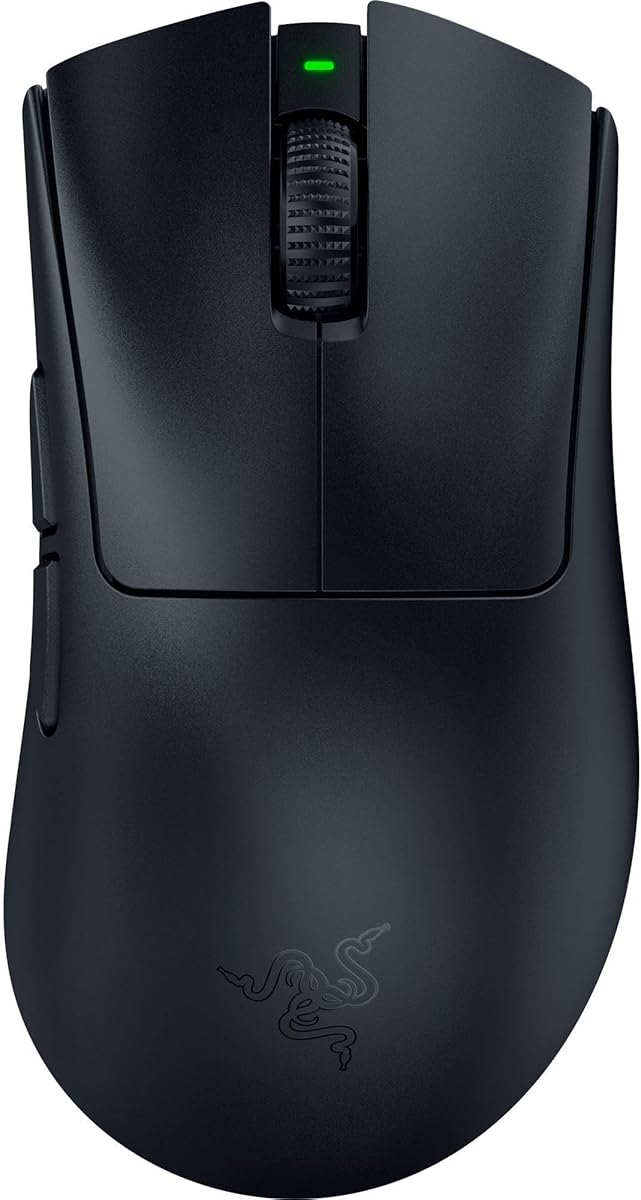
The Razer Viper V3 Pro CS2 Edition is an esports-focused wireless mouse that balances a 54 g weight, 35K optical sensor, and 8 kHz HyperPolling technology. Its supplied rating of 4.6 reflects a favorable customer response, while the CS2-specific design and promotional references to rushing B give it a clear competitive identity.
We may earn a commission when you buy through this link, at no additional cost to you.
The mouse is described as perfectly balanced and designed with esports professionals, creating a practical foundation for fast flicks and controlled tracking. Its Focus Pro 35K optical sensor includes intelligent functions and 1-DPI step adjustments, while the supplied specifications say it can track reliably on surfaces including glass. For competitive play, the 0.2 ms optical switch actuation and 90-million-click lifecycle are especially notable.
Razer HyperSpeed is paired with HyperPolling to support a true wireless polling rate of up to 8000 Hz. Battery life reaches up to 95 hours under competitive use according to the supplied information. Razer recommends disabling Windows' Enhance pointer precision and using Synapse for further optimization, so the best setup depends on a little software configuration rather than simply connecting the mouse.
This is an excellent general recommendation for CS2 players who want a lightweight but not extremely minimal mouse, a high-resolution sensor, and very high wireless polling. Its shape favors a specific grip style rather than every hand, and Synapse is needed for full optimization. Even so, the combination of weight, response, tracking, battery life, and CS2-focused presentation makes it the strongest all-around choice in this group.
At 54 g, the Viper V3 Pro offers a middle ground between bulkier ergonomic shells and the lightest esports designs. Its centered mass is intended to support fast swipes while retaining a more substantial feel than the smallest competition-focused mice.
The Gen-3 optical switches offer 0.2 ms actuation with no debounce delay, while 8 kHz HyperPolling targets high-refresh competitive setups. Together, they help keep the mouse responsive during repeated clicks and rapid directional changes.
We may earn a commission when you buy through this link, at no additional cost to you.
The SteelSeries Wireless Gaming Mouse CS2 Dragon Lore Edition combines a CS2-inspired appearance with an 18K TrueMove Air sensor, 2.4 GHz wireless gaming, and Bluetooth support. Its supplied rating of 3.7 is lower than the ratings of the other models, but the underlying specification set covers the essentials needed for responsive Counter-Strike play.
We may earn a commission when you buy through this link, at no additional cost to you.
The TrueMove Air optical sensor was co-developed with PixArt and is described as providing true 1-to-1 tracking with an 18,000-DPI maximum. The mouse supports lag-free 2.4 GHz wireless for gaming, while Bluetooth allows it to shift to broader device use. Its standout practical advantage is the stated battery endurance of up to 200 hours, which can reduce the need for frequent charging.
Switches are guaranteed for 80 million clicks, providing a reassuring longevity commitment, and the shell carries limited-edition styling inspired by the AWP Dragon Lore. The principal drawback is that the supplied information does not claim 8 kHz polling, a haptic trigger, or the same high sensor ceiling found among more specialized premium competitors. Its lower 3.7 rating also deserves attention when comparing customer feedback.
This mouse makes sense for a CS2 fan who values the theme, dependable wireless fundamentals, long battery life, and a more accessible approach to competitive hardware. It is less compelling for players who place maximum polling rates, advanced trigger controls, or a very low weight at the top of their buying priorities. For general CS2 sessions and themed setups, however, it remains a compelling entry.
The 2.4 GHz connection handles competitive gaming, while Bluetooth expands the mouse's usefulness beyond the PC. The stated 200-hour battery figure makes the model especially practical for players who value fewer interruptions over specialized trigger features.
The Dragon Lore-inspired appearance gives the mouse clear Counter-Strike character without compromising its core wireless and sensor package. It is a practical choice for players who enjoy coordinated themed peripherals alongside their game library.
We may earn a commission when you buy through this link, at no additional cost to you.
The Razer Viper V3 HyperSpeed is a wireless gaming mouse that prioritizes stable movement, broad tracking, and exceptional battery endurance. It carries a supplied rating of 4.4 and weighs 82 g, placing it in a more substantial category than the Viper V3 Pro and Viper V4 Pro. Its centered construction is intended to produce consistent swipes during competitive play.
We may earn a commission when you buy through this link, at no additional cost to you.
The Focus Pro 30K optical sensor is positioned toward the front of the mouse and uses intelligent functions to maintain tracking on a wider range of surfaces, including glass. Five DPI stages are available through a conveniently placed top button, and that control can be remapped. Gen-2 mechanical switches are rated for 60 million clicks and use gold-plated contact points for resistance against wear.
Its most striking specification is the stated battery life of up to 280 hours on one AA battery. Razer HyperSpeed supplies a low-latency wireless connection that is designed to remain stable in noisy environments, while multi-device support simplifies switching between computers. The 82 g weight may feel less nimble than the 49 g or 54 g alternatives, but it can also provide a steadier, more deliberate feel for players who dislike extremely light shells.
The Viper V3 HyperSpeed is best suited to competitive players who want a capable sensor and dependable wireless connection without prioritizing the absolute lightest possible design. Razer Synapse assists with optimization, and Windows' Enhance pointer precision should be disabled according to the supplied guidance. Overall, it is a versatile recommendation that trades some extreme specifications for battery life and a more substantial build.
A stated maximum of 280 hours makes the Viper V3 HyperSpeed one of the strongest choices for repeated scrims, long practice sessions, and players who do not want to keep a rechargeable mouse on the desk.
The forward sensor placement supports consistent tracking, while the top-mounted DPI control offers quick changes without opening software. The control can also be reassigned to a command that better matches the player's routine.
We may earn a commission when you buy through this link, at no additional cost to you.
The Razer DeathAdder V4 Pro combines a 56 g ergonomic shape with 8 kHz wireless polling and a Focus Pro 45K optical sensor. Its supplied rating is 4.4, and its mix of speed, familiar ergonomic styling, and flexible wired or wireless operation makes it a compelling all-round option for CS2 players.
We may earn a commission when you buy through this link, at no additional cost to you.
The second-generation Focus Pro sensor is specified to deliver 45,000 DPI, 900 IPS, and 99.8% tracking accuracy. The re-engineered shape is intended to support faster swipes and precise tracking in shooters, while Gen-4 optical switches are rated for up to 100 million clicks. An optical scroll wheel provides tactile feedback and gives players another physical control for in-game commands.
Razer HyperSpeed Wireless Gen-2 supports up to 8000 Hz polling, and the mouse can also be used in USB-C wired mode while maintaining the same maximum polling rate. Battery life is stated at up to 150 hours at 1000 Hz, so players operating at the highest polling frequency should expect a different endurance profile. Synapse offers settings for DPI, lift-off distance, polling rate, Dynamic Sensitivity, and Smart Tracking.
This mouse is a strong recommendation for someone who wants DeathAdder-style ergonomics without accepting the weight associated with older versions. It is particularly suitable for players who alternate between wireless freedom and a reliable wired connection. The tradeoff is that the headline battery endurance is tied to 1 kHz operation, and the best competitive configuration requires thoughtful software setup rather than leaving every setting at its default.
The 45K Focus Pro sensor tracks at up to 900 IPS and is designed for accurate movement across different surfaces. That makes it well matched to CS2 players who regularly snap their aim toward distant targets or make abrupt directional corrections.
Players can move between HyperSpeed wireless and USB-C wired operation without surrendering the stated 8 kHz polling capability. This flexibility is useful at home, during travel, or on a stage where one connection type is more convenient than another.
We may earn a commission when you buy through this link, at no additional cost to you.
The Razer Basilisk V3 is a wired ergonomic gaming mouse built for players who want a supportive shape, extensive controls, and a strong sensor without wireless battery management. It has a supplied rating of 4.6 and provides eleven programmable buttons, a HyperScroll tilt wheel, RGB lighting, and a Focus Plus 26K optical sensor.
We may earn a commission when you buy through this link, at no additional cost to you.
Its right-handed ergonomic form includes a thumb rest and places secondary controls within easy reach. The HyperScroll wheel can move between tactile and free-spin modes, allowing players to use it for rapid cycling or more precise input. Eleven buttons can be assigned to macros, communication commands, pings, and other secondary actions, making this a practical mouse for players who enjoy tailoring their peripheral.
Gen-2 optical switches provide 0.2 ms actuation and a rated lifespan of up to 70 million clicks. The 26K sensor is described as tracking with zero smoothing, which supports precise CS2 movement. Because the mouse is wired, there is no battery to charge, and players do not need to manage a wireless receiver or connection priority.
The Basilisk V3 is best for someone who prefers the familiar comfort and control layout of the Basilisk line. It may be less attractive to players who need a lightweight shell, maximum polling rates, or the freedom to move away from their cable. Even so, the strong 4.6 rating, generous control set, and 26K sensor create a well-rounded recommendation for flexible, comfort-focused play.
The contoured body and dedicated thumb rest support a relaxed right-handed grip. That makes the Basilisk V3 a useful alternative for players who find very small or aggressively angular esports shells uncomfortable during extended sessions.
Eleven programmable buttons allow secondary actions to sit directly under the player's fingers. The tilt wheel and its tactile or free-spin modes add further control, which is useful for both gameplay and everyday productivity.
We may earn a commission when you buy through this link, at no additional cost to you.
The Razer Basilisk V3 X combines the recognizable Basilisk ergonomic shape with HyperSpeed wireless, Bluetooth, and substantial battery life. It has a supplied rating of 4.4 and is built for players who want more comfort and customization than a minimal esports mouse but do not need the densest button layout.
We may earn a commission when you buy through this link, at no additional cost to you.
Its 18K advanced optical sensor is designed for responsive, pixel-precise aim without spinouts, while nine customizable controls support alternate commands and macros. The shape supports different grips, and its easy-access buttons sit where the fingers can reach them naturally. That makes the mouse a more comfortable choice for long sessions than many small competition shells.
Wireless operation comes in two forms: Razer HyperSpeed for low-latency gaming and Bluetooth for longer everyday use. The stated battery endurance reaches up to 285 hours on HyperSpeed and 535 hours on Bluetooth, though actual results vary with use. Mechanical Gen-2 switches are rated for 60 million clicks, and Chroma RGBL provides lighting that can react within supported games.
The Basilisk V3 X is a strong choice for a player who wants a wireless ergonomic mouse with excellent endurance and broad device support. It does not claim 8 kHz polling, and its nine controls are fewer than the eleven on the wired Basilisk V3. For general CS2 use, a comfortable grip, stable sensor, and dependable wireless link remain the priorities it addresses most convincingly.
The Basilisk form supports the hand more substantially than a compact esports design while remaining suitable for competitive shooters. Its combination of a thumb rest, broad shell, and accessible controls favors players who alternate between relaxed and active grip styles.
HyperSpeed keeps the mouse responsive during play, while Bluetooth and multi-device support allow it to move between gaming and everyday tasks. This makes the mouse more versatile than a dedicated wireless tournament model.
We may earn a commission when you buy through this link, at no additional cost to you.
The Razer Viper V4 Pro is an ultra-light wireless esports mouse weighing just 49 g. Its supplied rating is 4.5, and the combination of a 50K optical sensor, 8 kHz polling, optical switches, and a 180-hour battery at 1 kHz makes it one of the most aggressively performance-focused models in the roundup.
We may earn a commission when you buy through this link, at no additional cost to you.
The third-generation Focus Pro sensor tracks up to 930 IPS and 90 G of acceleration. Its Frame Sync function aligns sensor data with the PC to reduce latency, while 1-DPI step adjustments in Synapse 4 allow fine sensitivity control. Razer says HyperSpeed Wireless Gen-2 delivers true 8000 Hz polling and 55% lower latency than the previous generation, emphasizing fast communication between mouse and computer.
Gen-4 optical switches are rated for 100 million clicks and provide a tactile click feel. The mouse offers 180 hours of battery life at 1000 Hz, but only 45 hours at 8000 Hz. That difference is important for competitive players: maximum polling is designed for focused high-refresh play, while lower polling provides a much longer interval between charges. A grip tape, wireless dongle, and USB-A to USB-C cable are included.
This is a strong recommendation for a CS2 player who wants the lightest competition-focused design and maximum polling performance. It may be less attractive for someone who values maximum battery life at the highest polling setting or prefers a large ergonomic shape. The 49 g weight will also feel distinctly different from the 82 g Viper V3 HyperSpeed, so grip and comfort preferences remain important.
At 49 g, the Viper V4 Pro is the lightest model listed here by a clear margin. That low mass can reduce the effort required for rapid starts, stops, and flicks, particularly for players who adopt a fast, physically active aiming style.
Players can prioritize an 8 kHz connection for maximum competitive responsiveness or use the lower polling setting to gain up to 180 hours of battery life. Recognizing how often the mouse will be used in high-refresh sessions helps determine which operating mode is most practical.
We may earn a commission when you buy through this link, at no additional cost to you.
The Razer Basilisk V3 Pro blends a 35K optical sensor with a large ergonomic shape, thirteen customizable controls, and up to 140 hours of battery life. Its supplied rating is 4.4 makes it a strong feature-oriented recommendation for players who want extensive control options without moving to a wired setup.
We may earn a commission when you buy through this link, at no additional cost to you.
The Focus Pro 35K Gen-2 sensor provides granular 1-DPI adjustments and tracks across a wider range of surfaces, including glass. The mouse's signature shape supports the hand, while thirteen controls—including a multi-function trigger—can be assigned to communication commands, pings, macros, and other secondary actions. This makes it particularly useful for players who keep non-gameplay tools close at hand.
The HyperScroll tilt wheel can use tactile cycling, free-spin scrolling, or Smart-Reel mode, which automatically changes behavior according to scroll speed. Gen-3 optical switches provide 0.2 ms actuation and a 90-million-click lifecycle. Wireless battery life reaches 140 hours, while true 8 kHz polling requires the separately sold Razer Mouse Dock Pro or HyperPolling Wireless Dongle.
The Basilisk V3 Pro is ideal for someone who prioritizes comfort, programmable controls, and a high-resolution sensor. Players seeking 8 kHz wireless polling out of the box should account for the need for additional Razer hardware, while those who prefer a smaller symmetrical shell may find the design too substantial. With strong fundamentals and exceptional customization, it remains a versatile CS2 option.
Thirteen customizable controls create one of the broadest action surfaces in the guide. Combined with the multi-function trigger, they allow communication and gameplay commands to be placed where they can be reached without leaving the game.
Smart-Reel mode automatically alternates between smooth and tactile behavior based on scrolling speed. Players can therefore use the same wheel for quick menu movement and more deliberate in-game adjustments without constantly changing a setting.
We may earn a commission when you buy through this link, at no additional cost to you.
The Logitech G PRO X Superlight 2 is a well-established lightweight wireless option for competitive shooters. It weighs 60 g, supports 8 kHz polling, and carries a supplied rating of 4.5. Its HERO 2 sensor tracks above 888 IPS, reaches up to 44,000 DPI, and is calibrated to provide precision without smoothing, acceleration, or filtering.
We may earn a commission when you buy through this link, at no additional cost to you.
The design was created in collaboration with esports professionals and centers on a simple, dependable setup. Zero-additive PTFE feet are intended to create smooth gliding, while LIGHTFORCE hybrid switches provide a tactile click. A 95-hour stated battery life and USB-C charging offer a practical balance between wireless freedom and maintenance.
Compared with newer premium models, the Superlight 2 does not offer the haptic trigger system or detailed actuation control listed for the PRO X2 SUPERSTRIKE. Its supplied feature information is also more limited than that of several Razer competitors, particularly around programmable controls and scroll behavior. Nevertheless, its lightweight shape, high-resolution sensor, and high polling rate cover the central requirements of competitive CS2 play.
This mouse is a dependable recommendation for players who want a proven lightweight design without moving to the absolute minimum weight. It may be less suitable for someone who prioritizes adjustable haptics, a large set of side buttons, or a wired ergonomic shape. For a simple, focused competitive mouse, however, its combination of 60 g weight, 44,000-DPI sensor, and 8 kHz wireless remains compelling.
At 60 g, the Superlight 2 offers quick movement without reaching the extreme lightness of the Viper V4 Pro. The result is a mouse suited to fast competitive handling while retaining a more substantial feel for some players.
The HERO 2 sensor supports up to 44,000 DPI and tracks above 888 IPS with calibration designed to avoid smoothing, acceleration, and filtering. It is a capable foundation for both rapid flicks and controlled micro-adjustments in CS2.
We may earn a commission when you buy through this link, at no additional cost to you.
The right Mouse for CS2 comes down to the relationship between your grip, movement style, hardware setup, and desired level of control. Sensor specifications, polling rate, weight, switches, buttons, and wireless endurance are useful, but they matter most when they support the way you actually play.
Shape is often more important than a small difference in polling rate because it affects comfort, muscle memory, and control. The Viper models use compact esports shells intended for fast movement, while the Basilisk models provide a fuller right-handed shape with a thumb rest and more accessible controls. A player who prefers fingertip aiming and quick flicks may favor a compact design, while a palm or relaxed-claw grip may benefit from a larger ergonomic profile. Weight also changes how a shape feels in the hand, with the 49 g Viper V4 Pro offering a notably minimal feel and the 82 g Viper V3 HyperSpeed providing a more substantial one.
A competitive sensor should provide accurate movement with consistent lift-off behavior and minimal unwanted smoothing. The models here range from 18,000 DPI to 50,000 DPI, and several use forward-mounted sensors or 1-DPI step adjustments for finer sensitivity control. High DPI ratings alone do not determine precision, so players should also consider tracking speed, acceleration handling, surface compatibility, and whether their preferred software allows meaningful adjustment. The HERO 2 sensors in both Logitech models, the 35K and 45K Razer sensors, and the 35K Focus Pro in the Viper V3 Pro all offer detailed tracking specifications, but the best choice is the one that can be tuned and used consistently.
Polling rate describes how frequently the mouse reports movement to the computer. The Logitech PRO X2 SUPERSTRIKE, Logitech G PRO X Superlight 2, Razer Viper V3 Pro, Razer DeathAdder V4 Pro, and Razer Viper V4 Pro advertise 8 kHz wireless operation. The Basilisk V3 Pro can also reach 8 kHz with a separately sold dock or dongle, while the other listed models do not make the same 8 kHz claim. A high rate can benefit fast input in high-refresh competitive settings, but the entire system—including display, game settings, and connection—matters. Players should not assume a higher polling figure will transform their results without a stable environment.
Wireless convenience can be excellent, but the fastest polling modes often consume more power. The Viper V4 Pro is rated for up to 180 hours at 1000 Hz and 45 hours at 8000 Hz, illustrating the difference clearly. Other models provide headline figures of up to 95, 140, 200, 280, or 285 hours under specified conditions, with Bluetooth sometimes lasting longer than high-performance wireless. Wired mice eliminate charging and receiver concerns entirely. Players should think about how long they play, whether they travel, and how often the computer remains accessible before deciding between maximum polling and maximum endurance.
Button feel can influence rapid aiming and repeated firing. Optical switches are specified with actuation as low as 0.2 ms on the Viper V3 Pro, Basilisk V3, Basilisk V3 Pro, and Viper V4 Pro, while the DeathAdder V4 Pro uses Gen-4 optical switches rated for 100 million clicks. The Logitech PRO X2 SUPERSTRIKE goes further with a haptic inductive trigger, ten actuation points, and five rapid trigger reset levels. Mechanical switch options remain viable when a familiar feel and long service life are priorities. The best choice depends on how much importance you place on click speed, tactile feedback, durability, or trigger customization.
CS2 itself does not require a large number of mouse buttons, but side controls can be useful for communication, pings, and macros. The Basilisk V3 Pro provides thirteen customizable controls, the Basilisk V3 has eleven, and the Basilisk V3 X offers nine. Players who like keeping communication actions close at hand may appreciate these layouts, while purists may prefer a simpler mouse with fewer accidental inputs. The scroll wheel can also serve as an extra input, with the Razer HyperScroll models supporting tactile and free-spin behavior. Extra controls are only an advantage when they are mapped to actions the player genuinely uses.
Competitive tuning usually requires software for sensitivity, polling rate, lift-off distance, button assignments, and sensor behavior. Logitech's advanced features require G HUB, while Razer recommends Synapse and notes that Windows' Enhance pointer precision should be disabled for optimal accuracy. The Viper V4 Pro supports Synapse 4 on PC and Mac, while the Logitech PRO X2 SUPERSTRIKE is also compatible with PC and Mac. Before buying, confirm that the mouse works with the player's operating system and that the required configuration utility is available and comfortable to use.
Sensor performance depends partly on the surface beneath the mouse. Several Razer models advertise tracking across a wider variety of surfaces, including glass, but players should still verify the surface in their actual setup. Wireless receivers also need unobstructed space, and laptops may have limited USB-A ports or require an additional hub. A large desk, reduced wrist space, and a preference for wrist movement versus fingertip movement can all influence whether a particular model feels controlled. The supplied data does not include a universal recommendation for a specific pad, so the guide focuses on hardware and tracking features rather than assuming a particular playing surface.
Begin by installing the mouse and its configuration software, then update the operating system and set a sensitivity that feels controllable before changing several variables at once. For Razer models, the supplied guidance recommends disabling Windows' Enhance pointer precision and using Synapse to refine the setup. Logitech's advanced PRO X2 SUPERSTRIKE features require G HUB. If a model offers selectable polling rates, begin with a stable setting, compare it with your normal configuration, and revert if movement feels less consistent.
Choose a mousepad or other surface that provides enough room for the movement style you use. Keep the sensor free of dust, debris, and sticky residue, and clean the feet occasionally so they glide as intended. Wireless mice need a clear path to their receiver, while wired models should be routed so the cable does not pull against the mouse. Avoid wrapping a charged cable too tightly around the device, particularly around the connector.
For a gaming mouse, treat the feet and sensor as precision surfaces. Do not add unsanctioned tape or coatings over the feet, as that can change gliding behavior. Keep the shell and buttons clean with a soft, dry cloth, and avoid liquids around openings. If the mouse behaves inconsistently, test it on a clean surface, reconnect the receiver, review button assignments, and verify that lift-off or tracking settings have not changed. Periodically check firmware and software updates as well.
A lighter mouse can make rapid flicks and abrupt stops feel easier to perform because less force is needed to move it. That does not automatically make it better for every player, however. A moderately weighted or ergonomic shell may feel more controllable for some aiming styles, so the best choice is the one that supports accurate movement without causing strain.
An 8 kHz polling rate reports mouse movement more frequently than lower polling rates, which can be useful in fast competitive environments. The benefit depends on the rest of the setup and does not replace a stable connection, suitable sensitivity, or a sensor the player can control. It is best viewed as one part of a complete competitive configuration.
Wired mice remove concerns about charging, receiver interference, and wireless latency management, while modern wireless models can provide a similarly responsive experience. Wireless is more convenient for shared desks and travel, and several options in this guide support high polling rates. Choose based on your connection reliability, battery needs, and preferred setup.
Extra buttons can improve workflow by placing pings, communication commands, or macros within easy reach, but they do not inherently improve raw aim. Mapped actions should be useful and easy to press without disturbing the player's grip. Players who prefer a simple setup may find that a mouse with fewer controls is more comfortable.
There is no single DPI that suits every player because the right setting depends on mousepad space, monitor resolution, in-game sensitivity, and personal movement style. Start with a familiar configuration, use short controlled movements, and adjust gradually if tracking feels uncomfortable. The precise 1-DPI steps on several models make small changes easier to evaluate.
A themed model can add enjoyment and make a gaming setup feel cohesive, but the sensor, switches, shape, and connection should still meet your competitive needs. The SteelSeries Dragon Lore Edition combines themed styling with 2.4 GHz wireless, an 18K sensor, and long battery life, making the aesthetic one part of a functional package.
Start by using a clean, consistent surface and confirm that Windows pointer acceleration or Enhance pointer precision is not altering the intended behavior. Then check the mouse's lift-off and sensitivity settings in its software. If movement remains inconsistent, reconnect the receiver, try a different USB port, or test the mouse on another surface to isolate software, connection, and hardware factors.
A high maximum DPI provides room to adjust, but it does not mean every player should use that maximum. The Viper V3 Pro, SteelSeries CS2 Edition, and other 18K models can provide accurate competitive control, while 35K, 44K, 45K, and 50K options offer more adjustment headroom. A lower, stable setting that suits your movement is more valuable than selecting a number simply because it is higher.
The Logitech G PRO X2 SUPERSTRIKE is the strongest premium choice for players who want exceptionally fast click response, adjustable actuation, haptic trigger feedback, a 44,000-DPI sensor, and 8 kHz wireless polling. The Razer Viper V3 Pro offers the most balanced overall package, combining 54 g weight, a 35K sensor, 0.2 ms optical switches, and 8 kHz HyperPolling with a strong supplied rating.
Players prioritizing endurance can look toward the SteelSeries Wireless CS2 Edition, Razer Viper V3 HyperSpeed, or Razer Basilisk V3 X, while the Razer Viper V4 Pro stands out for its 49 g weight and maximum polling performance. Whichever model you consider, prioritize a comfortable shape, consistent sensor tracking, an appropriate grip, and settings that suit your movement rather than treating the largest specification as the only measure of performance.
Before purchasing, verify the current product details, software compatibility, connection requirements, and price for the specific listing. Product specifications, ratings, promotions, and availability can change, and personal comfort is difficult to predict from a specification sheet. Use this comparison to narrow the field, then check current retailer information to complete your Mouse for CS2 decision.

