
KM7B Full Tower NAS Case
Thirteen HDD bays
E-ATX motherboard support
Seven expansion slots
Our Full Tower Workstation Server Cases guide compares 10 models for storage, cooling, motherboard support, expandability, and workstation build needs.
Full tower workstation server cases combine the room required by demanding motherboards, multiple graphics cards, extensive cooling hardware, and high-capacity storage. A well-chosen chassis can support a compact NAS, a professional rendering system, or an expandable multi-GPU workstation while improving airflow, cable routing, and serviceability.
We compared all 10 products using the supplied specifications, focusing on motherboard support, drive capacity, cooling provisions, expansion-slot availability, graphics-card clearance, front connectivity, and physical dimensions. The list covers models for high-density storage, quiet office builds, heavily equipped workstations, and systems requiring specialized rack-style hardware.
Each review explains the strongest reasons to consider a particular chassis, along with practical limitations that may affect compatibility. Our top selections represent the best balance of features, while pricing, inventory, and component availability can change, so readers should confirm current listings before purchasing.

5.0Editor score

4.6Editor score
The comparison highlights motherboard compatibility, storage capacity, cooling provisions, expansion potential, and distinctive chassis features across all 10 cases, making it easier to identify the right foundation for a workstation or server build.



The Antec 900 Full-Tower E-ATX PC Case earns a 5.0 rating and stands out as the most balanced choice in this guide. It combines broad motherboard support, substantial graphics-card clearance, six included PWM fans, nine drive positions, USB Type-C connectivity, and tool-free access without specializing too narrowly around one type of workstation.
We may earn a commission when you buy through this link, at no additional cost to you.
Its airflow arrangement is particularly useful for high-power builds. Three 140mm fans sit at the front, two 120mm reverse fans pull air across the power-supply shroud, and one 140mm rear fan handles exhaust. The front position can accept a radiator up to 420mm, giving builders flexibility between air and liquid cooling while the included fans reduce the need to source every cooling component separately.
The chassis accommodates E-ATX, SSI-EEB, Threadripper, and back-connect motherboards. It also provides enough space for two graphics cards up to 495mm long and 160mm thick, although users should verify detailed board and cooler dimensions before ordering unusually thick accelerators. Nine drive positions make the case useful for a substantial workstation, though it is not as storage-dense as a dedicated NAS enclosure.
This is the strongest general recommendation for professionals assembling a rendering, AI development, virtualization, or multi-GPU system. The tempered-glass panel, reusable PCIe slot covers, full dust filtration, and tool-free side access improve everyday ownership, while the included cooling fan package simplifies the initial build. It is less suitable for users who require dozens of hot-swappable drives.
The Antec 900 deserves the Editor's Choice designation because it balances capacity, cooling, convenience, and component support. Buyers should measure their motherboard, graphics cards, power supplies, and cooling hardware in advance, but the listed specifications indicate a particularly capable foundation for a modern full tower workstation.
The six-fan configuration creates intake and exhaust paths around the CPU, GPU, and power-supply area. Its 420mm front-radiator support also gives builders room to adopt liquid cooling when processor and accelerator heat loads justify it.
Support for dual graphics cards up to 495mm long makes the chassis relevant to visualization, machine learning, and other accelerator-heavy builds. Buyers should still check connector placement, slot spacing, and power requirements for their chosen cards.
We may earn a commission when you buy through this link, at no additional cost to you.
The Rosewill Thor NAS Full Tower Workstation Server Chassis has a 3.9 rating and focuses on unusually flexible, high-density storage. It supports up to 11 3.5-inch hard drives or 13 2.5-inch solid-state drives, making it a compelling foundation for a home lab, private NAS, AI data server, or media repository.
We may earn a commission when you buy through this link, at no additional cost to you.
Storage is not its only strength. The chassis accepts E-ATX motherboards, expansion cards as long as 400mm, and includes a front USB 3.2 Type-C port for convenient data transfer. Eleven external 5.25-inch drive bays add another layer of expansion options, although the exact internal arrangement may require careful planning when mixing drive types.
Cooling is the main consideration. A single 140mm PWM fan and streamlined airflow design are listed, but a high-density storage server will often benefit from additional intake and exhaust fans. Users should also account for the noise and vibration generated by multiple spinning drives and ensure that the selected drives use compatible trays and connections.
This chassis makes the most sense for a build whose primary objective is storage capacity rather than a decorative workstation appearance. It also suits users creating AI or NAS systems that need substantial data capacity and enough expansion space for acceleration or networking cards. It is less appropriate for buyers wanting a quiet, pre-cooled, visually polished office build.
Despite its modest customer rating, the Thor's drive flexibility is the defining benefit. Buyers comfortable planning airflow and cable management can create a particularly capable storage-focused system, while those seeking turnkey convenience should choose a model with more included cooling hardware.
The ability to hold 11 hard drives or 13 solid-state drives gives the Thor an edge for large libraries, backups, and virtual-machine data. A mixed-drive configuration may also be useful for combining archival capacity with fast solid-state storage.
Because only one PWM fan is specified as included, builders should evaluate fan positions and heat generated by the selected CPUs and drives. Added intake and exhaust fans can improve temperature consistency across a densely populated chassis.
We may earn a commission when you buy through this link, at no additional cost to you.
The Phanteks Enthoo Pro 2 Server V2 is a full tower designed for workstation and server systems where airflow and expansion matter more than a minimalist appearance. Its all-metal mesh panels support unrestricted airflow, while the spacious interior can accommodate SSI-EEB motherboards, 480mm and 360mm radiators, and eleven PCI slots.
We may earn a commission when you buy through this link, at no additional cost to you.
Storage capacity is listed for up to 10 hard drives or 11 solid-state drives. The chassis can hold as many as 15 fans, including three positioned directly over the PCI and CPU area. That degree of cooling flexibility makes it appropriate for power-hungry processors, multiple expansion cards, and sustained workloads that require consistent airflow.
The lack of a supplied customer rating means there is not enough user feedback to characterize long-term satisfaction. Buyers should therefore inspect the listing closely and verify the exact drive trays, motherboard mounting provisions, and included accessories. The specification summary does not mention a front Type-C port, so systems requiring that connection should confirm it independently.
This model is best suited to technical users who intend to tune cooling and install specialized hardware. It can suit a multi-GPU rendering system, a compute server, or a storage-heavy workstation, especially when the builder is comfortable selecting additional fans and managing a dense interior.
The Enthoo Pro 2 Server V2 remains one of the strongest choices for maximum airflow and expansion. Its all-metal construction, eleven PCI slots, SSI-EEB support, and ability to accept very large radiators distinguish it from more conventional full tower designs.
Full metal mesh panels reduce the need to rely on narrow vents to move air through a densely equipped system. This is especially helpful when several graphics cards, storage devices, and power supplies compete for internal space.
Eleven PCI slots and support for large motherboards offer room for accelerator, storage, and networking cards. Users should confirm card thickness, slot spacing, and cooling clearance for their particular multi-card configuration.
We may earn a commission when you buy through this link, at no additional cost to you.
The Fractal Design Define 7 XL has a 4.6 rating and delivers an exceptional combination of refined construction and workstation capacity. Its brushed aluminum and steel enclosure houses motherboards up to E-ATX and SSI-EEB, while the default storage layout supports as many as 18 hard drives and five solid-state drives.
We may earn a commission when you buy through this link, at no additional cost to you.
One of the chassis's most attractive features is its ability to switch to an open layout for custom water cooling. In that configuration, large reservoirs and radiators up to 480mm can be accommodated, giving builders substantial freedom when creating a quiet or visually coordinated high-performance system. Multi-brackets also allow unused fan positions to become storage or pump mounts.
The refined front door uses reversible dual-handed hinges and magnetic latching, and the modular interior helps keep cables controlled. These details do not directly improve benchmark performance, but they make a large, complex workstation more pleasant to assemble and service than an unmanaged open-frame build.
The Define 7 XL is ideal for professional users who want substantial storage, premium materials, and advanced cooling options in one package. It can serve as a quiet editing workstation, a large NAS with carefully selected drives, or a custom-loop compute system. Users should still map out drive positions and radiator mounting before committing to a layout.
For buyers who value refinement alongside capacity, this is the premium selection. Its combination of 18 hard-drive mounts, flexible fan brackets, large motherboard support, and custom-loop headroom gives it exceptional versatility within this roundup.
The default layout can organize 18 hard drives and five solid-state drives, making the enclosure suitable for large archives, media libraries, and backup systems. Bay assignments should be checked against cable reach and airflow needs.
Brushed aluminum, steel, magnetic latches, and dual-handed hinges create a polished enclosure with straightforward access. The design suits professional workspaces where visual presentation and orderly assembly are priorities.
We may earn a commission when you buy through this link, at no additional cost to you.
The Antec Flux Pro has a 4.7 rating and stands out for flexible cooling arrangements. It can support as many as 12 fans simultaneously and includes six PWM fans: three 140mm Tranquil 140 PWM fans at the front, two P12R PWM reverse fans on the power-supply shroud, and one Tranquil 140 PWM fan at the rear.
We may earn a commission when you buy through this link, at no additional cost to you.
Its cooling hardware can accept a 420mm radiator and a 360mm radiator at the same time. Removable brackets at the top, front, and power-supply shroud give users meaningful control over the layout, which is valuable for custom-loop systems, quiet workstations, and processors that benefit from substantial radiator surface area.
The 90-degree iShift power-supply mounting option can improve airflow beneath the power supply, while the CPU and GPU dual temperature display gives users a quick internal status reference. The combination of metal, glass, and wood produces a more textured appearance than a conventional all-metal server chassis.
This case is a good match for builders who want a visually interesting workstation without giving up component flexibility. It is less compelling for a purely conventional rack-style server, and simultaneous radiator installation requires careful attention to fan direction, tubes, and the positions of the CPU cooler and graphics card.
For users planning extensive cooling, the Flux Pro is one of the strongest choices in the list. Its twelve potential fan positions, six included fans, and support for two large radiators provide an unusually versatile foundation for a custom workstation.
Support for twelve fans and simultaneous 420mm and 360mm radiators enables several airflow layouts. Users can prioritize quiet high-static-pressure fans, maximum cooling, or a balanced configuration based on their hardware.
The integrated CPU and GPU temperature display provides a quick view of the two most important heat sources. It is a convenient supplement to software monitoring when diagnosing a new workstation build.
We may earn a commission when you buy through this link, at no additional cost to you.
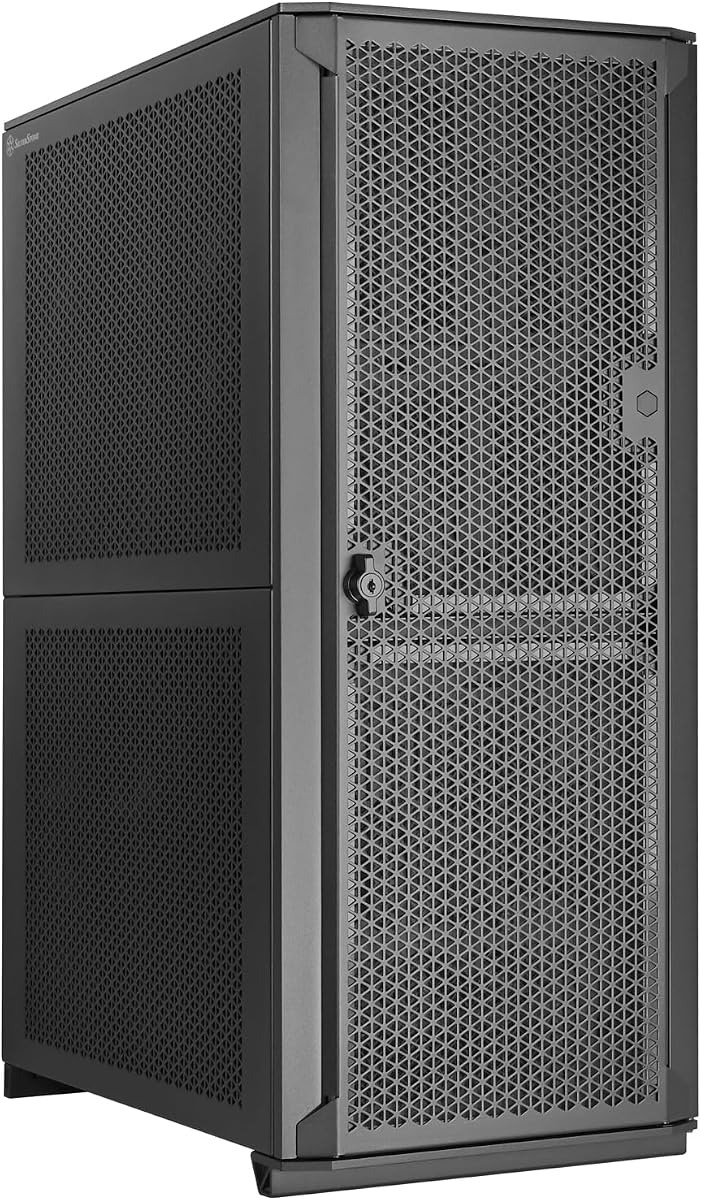
The KM7B Full Tower NAS Case is the budget-oriented storage selection, offering 13 HDD and two SSD drive bays in a chassis that supports Micro-ATX, ATX, and E-ATX motherboards. Its high number of hard-drive positions makes it appealing for entry-level private clouds, backups, and media servers.
We may earn a commission when you buy through this link, at no additional cost to you.
The enclosure provides seven PCIe slots plus three additional positions and supports a wide range of fan sizes. Front and rear positions accept 120mm or 140mm fans, while the top supports three 120mm or two 140mm units. The stated 360mm and 280mm liquid-cooling support gives users room to employ a dedicated CPU cooling loop.
Graphics-card clearance depends on the storage configuration. The listed maximum is 417mm without drive bays and 280mm with them, a difference that matters when planning a display, rendering, or GPU-accelerated NAS. CPU coolers can reach 180mm, and an ATX PS2 power supply is supported.
The KM7B makes the most sense for builders whose priority is a large number of disks at a lower entry point. It does not include the premium finish, extensive fan package, or specialized hot-swap features found in some alternatives. The absence of a customer rating also means buyers should review the current listing and component details carefully.
For a straightforward high-capacity NAS or backup server, this case delivers an unusually dense set of drive bays and flexible board support. Confirming the final drive layout and graphics-card clearance before assembly is the most important planning step.
Thirteen HDD bays give the KM7B a strong advantage for backup, media, and private-cloud systems. Users should confirm how the drive trays interact with expansion cards and cooling hardware.
Graphics-card length varies substantially depending on whether the drive bays are occupied. This makes the chassis well suited to storage-first builds but requires attention in accelerator-equipped configurations.
We may earn a commission when you buy through this link, at no additional cost to you.
The SilverStone SETA H2 has a 4.4 rating and is designed as a full-size workstation tower rather than a conventional compact PC enclosure. It supports SSI-EEB, SSI-CEB, E-ATX, ATX, Micro-ATX, and Mini-ITX motherboards, giving it broad compatibility with specialized workstation boards.
We may earn a commission when you buy through this link, at no additional cost to you.
Eight available expansion slots and multi-GPU capability make it relevant to professional visualization, compute, and engineering systems. Storage capacity reaches 15 2.5-inch SSDs or 3.5-inch hard drives, including support for 15mm-thick solid-state drives, while the steel chassis provides a robust structural foundation.
Airflow enters through a fully perforated front mesh panel. However, the supplied information explicitly states that fans are not included, so users must budget for a complete cooling solution. That makes the SETA H2 more appropriate for builders who already understand fan placement, radiator compatibility, and component clearance than for a first-time assembler seeking a turnkey package.
The case is best for professional multi-GPU projects that need expansion slots and a wide range of motherboard standards. It could also serve as a storage server with numerous drives. Users should confirm the exact arrangement of the 15 drive positions, cable routing, and graphics-card dimensions because those details determine whether every planned component fits.
With its durable steel construction, broad board support, and eight expansion slots, the SETA H2 is a strong specialist option for complex workstations. The lack of included fans is its defining drawback and should be considered part of the build rather than an overlooked accessory.
Eight expansion slots offer room for several graphics, network, or storage controllers. Power delivery, cooling, and physical card thickness remain important constraints in any multi-accelerator workstation.
Support for 15 drives and numerous motherboard formats creates a flexible foundation for mixed workstation roles. Backplane, connector, and tray details should be checked for the intended storage architecture.
We may earn a commission when you buy through this link, at no additional cost to you.
The Fractal Design Pop XL Air RGB carries a 4.7 rating and is the most style-focused model in this roundup. Its black tempered-glass side panel presents internal components clearly, while four included 120mm Aspect RGB fans make it easy to create an illuminated workstation without immediately sourcing a full fan set.
We may earn a commission when you buy through this link, at no additional cost to you.
Motherboard support extends to E-ATX boards up to 280mm, ATX, Micro-ATX, and Mini-ITX. Cooling options include radiators up to 360mm at the front, 280mm at the top, and 140mm at the rear. The chassis can hold four hard drives and six SSDs, or three hard drives and five SSDs when an optical bay is in use.
Two 5.25-inch bays are concealed behind a storage drawer and magnetic cover, preserving a cleaner exterior. This makes the Pop XL Air more suitable for a polished office, editing suite, or gaming-class workstation than a traditional server rack, although it remains technically capable of hosting E-ATX workstation components.
Users should choose it when appearance, integrated lighting, and moderate storage matter more than high-density or hot-swappable drive arrangements. It can work well for a creative workstation with several fast SSDs and a few archival hard drives. Builders intending to fill every bay should note the reduced drive count when using optical storage.
The Pop XL Air RGB balances useful full-tower room with a more consumer-oriented presentation. Its included lighting fans, tempered glass, flexible radiator support, and strong 4.7 rating make it a compelling choice for a modern workstation that needs to look polished in an office or studio.
Four RGB fans and a clear tempered-glass panel make internal components part of the visual design. The result suits a professional office or creative studio better than a utilitarian server enclosure.
Front, top, and rear radiator positions support several cooling layouts, while the drive capacity focuses on SSDs. This balance works well for fast workstation storage rather than bulk archives.
We may earn a commission when you buy through this link, at no additional cost to you.
The SilverStone ALTA D1 has a 3.9 rating and serves a highly specialized workstation role. It supports 12-by-13-inch SSI-EEB and 15.12-by-13.2-inch specialized motherboards, making it most relevant to builders using enterprise-oriented platforms rather than standard E-ATX boards.
We may earn a commission when you buy through this link, at no additional cost to you.
Its modular design supports up to 11 expansion slots for multi-workstation graphics configurations, with total graphics-card clearance of 407mm. Multiple modules and dual power-supply capability offer considerable power and expansion flexibility. The chassis can also accommodate three 360mm radiators, allowing a serious cooling network around dense hardware.
High-grade steel provides the robustness expected in a specialist chassis, but the specialized motherboard formats and modular layout add complexity. Planning must account for power distribution, riser or interconnect requirements, expansion-card arrangement, and the specific module selected. These are important details for engineers integrating high-end server platforms.
The ALTA D1 is best for enterprise engineers, workstation integrators, and advanced creators using specialized boards and multiple accelerators. It is not a sensible general-purpose enclosure for a standard E-ATX workstation unless the buyer values the additional chassis architecture for a future platform.
Its principal strength is the scale of possible expansion: 11 slots, dual power supplies, and three large radiator mounts. The 3.9 rating should prompt buyers to investigate recent customer feedback, while the specifications remain compelling for specialized enterprise builds.
Support for proprietary and SSI-EEB platforms distinguishes the ALTA D1 from ordinary full towers. Buyers should verify exact board dimensions, connector locations, and required module compatibility.
Dual power supplies and three 360mm radiator positions support a densely equipped workstation. Power redundancy, load distribution, and cooling remain individual system-design decisions.
We may earn a commission when you buy through this link, at no additional cost to you.
The SilverStone CS383 has a 4.5 rating and focuses on a clean eight-bay hot-swappable storage architecture. Its drive trays accept 3.5-inch or 2.5-inch SAS-12G and SATA-6G drives, making it well suited to a private cloud, backup server, or storage appliance where replacing failed media without opening the chassis is valuable.
We may earn a commission when you buy through this link, at no additional cost to you.
Motherboard support extends to E-ATX and SSI-EEB. Eight expansion slots and 340mm maximum graphics-card or adapter-card length provide room for network controllers, acceleration cards, and other server functions. The graphics allowance is noteworthy compared with cases where populated drive cages sharply reduce card clearance.
Cooling support includes a 420mm liquid-cooling radiator or air coolers up to 186mm. The chassis can also operate with dual power supplies and support up to four additional 5.25-inch drive bays. These features make it a flexible base for a compact enterprise-style system rather than a simple storage box.
The main limitation is that its native storage capacity is eight hot-swappable trays, fewer than several competing models in this guide. Additional 5.25-inch bays can extend storage but do not necessarily provide the same hot-swap convenience. Users should choose the CS383 for serviceability and connector support rather than for the highest possible bay count.
For a business NAS or compact data server, the CS383 provides one of the most purposeful designs here. Its hot-swappable enterprise-compatible trays, E-ATX support, optional dual power supplies, and roomy expansion make it especially attractive where maintaining uptime and quick drive replacement matter.
Hot-swappable trays allow failed or upgraded drives to be exchanged more quickly than with permanently mounted media. The selected drives must use supported SAS or SATA connections and appropriate backplane hardware.
Eight expansion slots, optional dual power supplies, and extra 5.25-inch bay support allow the storage chassis to become a more complete server platform. Power and cooling redundancy require deliberate system-level design.
We may earn a commission when you buy through this link, at no additional cost to you.
A suitable workstation server case must accommodate the motherboard, processors, accelerators, storage, cooling, and power hardware already selected for the build. Comparing internal dimensions and expansion capabilities prevents expensive incompatibilities and leaves room for future upgrades.
Begin with the motherboard standard, because it determines which chassis can be used at all. Standard ATX and Micro-ATX boards fit many full towers, while E-ATX provides additional expansion and power connectors for workstation processors. SSI-EEB and SSI-CEB boards support the most demanding platforms but require larger, purpose-built cases such as the Phanteks Enthoo Pro 2 Server V2, Fractal Design Define 7 XL, SilverStone SETA H2, or SilverStone ALTA D1.
Also check the case's dimensional limits rather than relying only on the form-factor label. Board outlines, rear-panel arrangements, cable-routing space, and socket positions can differ even among products advertised for the same standard. Match the exact motherboard model against the manufacturer's compatibility information before buying.
Workstations may contain multiple long or thick graphics cards, and server cases can place storage cages directly in front of expansion slots. Compare maximum card length and thickness against the manufacturer's dimensions, including any reduction that occurs when drive bays are populated. The Antec 900 allows GPUs up to 495mm long and 160mm thick, while the SilverStone ALTA D1 and CS383 provide 407mm and 340mm respectively.
For multi-GPU systems, review slot spacing, power connectors, riser-cable needs, and cooler compatibility in addition to raw length. A card can technically fit while still blocking neighboring slots or preventing access to power connectors. Dense accelerator configurations should never be based on maximum dimensions alone.
Storage requirements can range from a handful of fast SSDs to more than a dozen hard drives. Hot-swappable trays are useful in a NAS or business server because they simplify replacement, while high-count fixed bays are often better for large archives. The Rosewill Thor NAS supports 11 hard drives or 13 SSDs, the Fractal Design Define 7 XL supports 18 hard drives and five SSDs, and the SilverStone CS383 provides eight hot-swappable trays.
Check whether 2.5-inch and 3.5-inch devices can be mixed, whether 15mm drives are supported, and whether a backplane or proprietary connection is required. Also consider airflow across every populated bay and the noise generated by spinning disks. High-density storage needs more than sufficient bay count; it requires a cooling and vibration plan as well.
Cooling support must match the heat output of the CPU, graphics cards, and storage. Compare fan positions, radiator dimensions, rear exhaust options, and whether fans are included. The Antec 900 and Flux Pro each include six PWM fans, the Pop XL Air RGB includes four lighting fans, and the SETA H2 explicitly ships without fans.
Radiator compatibility is equally important. Look for support at the front, top, and rear, then verify whether two radiators can operate simultaneously. Users should also account for CPU-cooler height and the position of the power-supply shroud. A case can advertise a large radiator while still conflicting with a particular cooler, reservoir, or motherboard layout.
Expansion-slot count indicates how many add-in cards the case can host, but it does not guarantee that every card can operate at full bandwidth. Workstation platforms may require specific slot arrangements, CPU lanes, bifurcation settings, or riser cables. The Phanteks Enthoo Pro 2 Server V2 and SilverStone ALTA D1 each support eleven slots, while the Antec 900, SETA H2, and CS383 provide eight.
Users should list every network card, storage controller, capture card, accelerator, and other controller in the planned system. Count occupied slots, inspect spacing, and verify that every card receives adequate airflow. A generous slot count is useful only when the motherboard, wiring, and cooling architecture are designed to support it.
Power requirements vary from a single standard unit to a dual-power-supply architecture. The Antec Flux Pro offers a 90-degree iShift power-supply mount, while the SilverStone ALTA D1 and CS383 support dual power supplies. The KM7B accepts an ATX PS2 power supply. Check form factor, connector positions, orientation, and whether the chosen layout blocks access to a modular power supply.
For dual-power-supply designs, determine how the redundant or additional units are intended to operate and how load is divided. Extra power capacity does not automatically create redundancy, and redundant operation requires compatible hardware and management. High-end workstation builders should plan cables and airflow around the actual power architecture rather than simply fitting the largest available units.
Front-panel connections matter when data is transferred regularly or a system is managed from a desk. The Rosewill Thor NAS includes USB 3.2 Type-C, and the Antec 900 supports USB Type-C 3.2 Gen 2. Other cases may provide conventional USB and audio connections, so users needing modern Type-C should verify the exact port and its position before assembly.
Serviceability includes tool-free panels, removable drive trays, reusable expansion-slot covers, and accessible dust filters. The Antec 900 provides a tool-free tempered-glass side panel and full front, top, and bottom filtration. The CS383 focuses on hot-swappable storage. Choose based on the components most likely to require frequent attention.
Full tower dimensions can challenge tight office spaces, and some cases include dense cages or external radiators that increase their footprint. The KM7B measures 475 by 230 by 503mm, but buyers should check the dimensions and shipping requirements of the selected model. Leave clearance for front-panel access, cable movement, dust-filter removal, and airflow.
Appearance is not merely cosmetic in professional environments. The Fractal Design Define 7 XL provides a restrained aluminum enclosure, while the Pop XL Air RGB emphasizes tempered glass and lighting. The SilverStone SETA H2 and ALTA D1 favor robust steel and perforated panels. Choose the design that fits the workspace and maintenance style without compromising component compatibility.
Before assembling the system, place the empty chassis on a stable surface and inventory every included screw, bracket, tray, and cable. Install the motherboard, power supply, storage devices, and expansion cards before completing the cable-management pass. Use the case's labeled positions to match front intake, rear exhaust, and power-supply shroud airflow rather than placing fans by convenience alone.
Install drives according to the manufacturer's locking procedure, particularly for hot-swappable trays. Route SATA, power, and data cables away from fans and sharp edges, while allowing service loops at both ends. Verify that side panels do not press against connectors and that every expansion card has sufficient clearance for the adjacent components and airflow path.
After the first startup, check CPU and GPU temperatures, fan behavior, storage temperatures, and system stability under representative workloads. Keep removable dust filters clean, inspect drive vibration and airflow, and avoid blocking intake openings. Periodic visual inspections and filter maintenance help preserve cooling consistency, particularly in systems with several hard drives or multiple high-power accelerators.
Not necessarily. An E-ATX case supports a large motherboard format but may focus on appearance and conventional PC features, while a server chassis may emphasize hot-swappable drives, rack-style storage, redundant power, and specialized cooling. The best choice depends on the actual server features required by the project.
Capacity varies widely, ranging from four hard-drive positions in the Pop XL Air RGB to 18 in the Define 7 XL's default layout. Some models offer more SSD-specific positions, while others prioritize hot-swappable enterprise trays. Count the exact storage devices, controllers, and cables your build requires before selecting a chassis.
A full tower is often appropriate because multiple accelerators require sufficient slot spacing, power connectors, airflow, and cable room. The largest cards and dense multi-GPU layouts can exceed compact-case constraints. Compare card length, thickness, slot count, cooling position, and power requirements rather than relying only on the number of graphics processors.
They are useful when quick replacement, redundancy, or frequent maintenance matters. A conventional NAS with a modest number of drives can often use less complex fixed or removable drives. Hot-swap support still requires a compatible backplane, controller, connectors, and appropriate operating-system configuration.
Many of them can. The Antec 900 supports a front radiator up to 420mm, the Define 7 XL can accommodate radiators up to 480mm in its open layout, and the Flux Pro supports a 420mm radiator and a 360mm radiator simultaneously. Always verify radiator thickness, pump position, tubing route, and CPU-cooler clearance.
Choose a board that matches the CPU, memory capacity, expansion needs, and operating system. E-ATX is common for powerful desktop processors, while SSI-EEB or specialized boards support certain enterprise platforms. The chassis must support the exact board dimensions and required connectors, not merely a similar form factor.
It depends on the hardware. Cases such as the Antec 900, Flux Pro, and Pop XL Air RGB include substantial fan packages, while the SilverStone SETA H2 does not include fans. High-power CPUs, multiple GPUs, and dense hard-drive arrays often require additional intake or exhaust airflow and careful balance.
Leave enough room to open panels, remove dust filters, connect cables, and maintain front airflow. The exact required clearance depends on the model, floor or desk, and whether a radiator or reservoir extends beyond the chassis. Checking the listed case dimensions before delivery is the safest approach.
The Antec 900 Full-Tower E-ATX is the strongest all-around selection, combining six PWM fans, dual-GPU clearance, nine drive positions, dust filtration, and broad motherboard support. The KM7B is the practical budget choice for storage-heavy builds, while the Fractal Design Define 7 XL offers premium materials, extensive drive mounts, and large custom-cooling capacity.
Other builds may be better served by a more specialized case. The Rosewill Thor NAS prioritizes dense storage, the Phanteks Enthoo Pro 2 Server V2 emphasizes airflow and expansion, and the SilverStone CS383 provides hot-swappable enterprise-style storage. The SETA H2, ALTA D1, Flux Pro, and Pop XL Air RGB each suit distinct professional priorities ranging from multi-GPU expansion to cooling flexibility and polished styling.
Before ordering, verify the exact motherboard, card dimensions, drive connectors, cooling hardware, power configuration, and available workspace against the manufacturer's specifications. Component standards and component availability can change, so confirm the current listing and compatibility documentation before completing the purchase.