
KBDcraft 07Israfel 50% White
4.3Editor score
Low-profile 56-key ortholinear
Seven hinge tilt positions
Hot-swappable 3-pin switches
Compare 10 Ortholinear Keyboards, with key specifications, product ratings, pros and cons to help you choose.
Ortholinear keyboards arrange keys in straight vertical and horizontal columns instead of the staggered rows found on conventional keyboards. This layout can encourage straighter finger travel and support a more neutral wrist position, making it attractive to programmers, writers, and anyone adapting to ergonomic split designs.
The keyboards in this guide were compared by layout, key count, split adjustability, switch support, programming options, connectivity, and intended assembly level. The list includes complete low-profile boards, wired split models, barebones kits, and several alternatives whose layouts or features make them useful points of comparison.
Each review identifies the strongest reasons to consider a model, along with practical limitations such as adaptation time, missing components, or limited layout compatibility. Ratings and specifications reflect the supplied product information, while prices and availability can change, so shoppers should confirm current details before purchasing.
4.3Editor score

4.2Editor score

3.8Editor score
This side-by-side comparison covers the most important differences among the ten boards, including key arrangement, physical size, connection method, programmability, and assembly requirements.

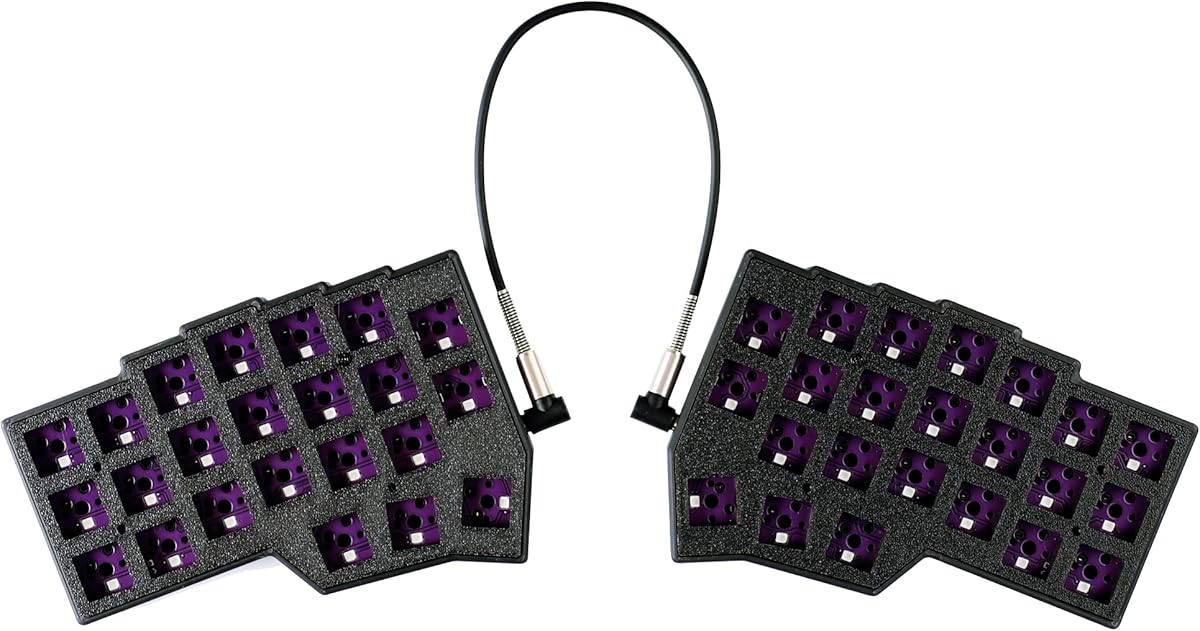


The KBDcraft 07Israfel 50% in White earns a 4.3 rating by combining a true ortholinear arrangement with a compact, low-profile construction. Its 56 keys occupy relatively little desk space, while the split case and vertical key columns offer a more purposeful alternative to a conventional staggered keyboard. The included full-kit format also makes it more approachable than a barebones board.
We may earn a commission when you buy through this link, at no additional cost to you.
Its most attractive feature is the Core56 low-profile system. The keyboard uses 3-pin low-profile switches with hot-swap sockets developed with Kailh, and the supplied low-profile MX-style keycaps are produced by KeyTok. The hinge-split case offers seven tilt positions, letting users alter the relationship between the two halves. The adaptive gasket mount adds flexibility and is intended to reduce transmitted vibration and noise.
Programmability is another strong point. Vial support allows users to remap keys, define macros, create shortcuts, and adjust RGB effects. That makes the board well suited to programmers, writers, and users who want a compact layout without giving up layer-based workflows. Its white finish and Lego-compatible case also distinguish it visually from the dark, more industrial split keyboards that dominate this category.
The main limitation is the wired connection. There is no Bluetooth or 2.4 GHz mode, and the small 56-key design omits a conventional function row. Buyers accustomed to full-size boards may therefore need to use software layers for missing commands. Even so, the combination of low-profile construction, ortholinear geometry, adjustment, and hot-swapping makes this the strongest budget-oriented choice in the list for shoppers ready to adapt.
The 56-key footprint saves considerable desk area without adopting the extreme 40% format. That balance is useful for programmers who need navigation and editing keys but do not want a traditional full-size keyboard occupying an entire workstation.
Seven hinge tilt positions and a gasket mount provide meaningful physical customization. Users can experiment with the board angle while retaining the straighter finger alignment that makes an ortholinear layout appealing.
We may earn a commission when you buy through this link, at no additional cost to you.
This 4×6 Corne-layout keyboard receives a 4.2 rating and stands out for a feature set that goes beyond a minimal split board. Its 58-key layout includes four thumb keys on each side and two knobs, while the split design allows changes to spacing, tilt, and rotation. These features make it a serious option for users willing to learn a new key arrangement.
We may earn a commission when you buy through this link, at no additional cost to you.
The keyboard supports hot-swappable 3-pin and 5-pin mechanical switches, including Cherry MX-compatible options. It arrives with pre-lubricated 40g linear switches described as silent in the product title, a useful starting point for people who want responsiveness without excessive noise. The included two-in-one shaft puller simplifies switch or keycap changes without requiring a separate tool.
Vial support provides extensive control over the experience. Every key can be remapped, custom layers can create quick-access shortcuts, and RGB lighting can be adjusted by color, brightness, and speed. Forty-five preset lighting effects are listed, including rainbow, breathing, and rhythmic modes. The two rotary encoders add another way to navigate or trigger workflow-specific commands.
This is not a casual-user recommendation. The supplied information explicitly notes a one-to-two-week adaptation period for people moving away from a traditional staggered layout, and the design assumes familiarity with custom mechanical keyboards. Those caveats matter, but for programmers, dedicated typists, and enthusiasts who want knobs alongside a compact ortholinear split layout, the customization and hot-swapping support are compelling.
Two rotary encoders provide tactile controls for actions such as scrolling, volume, or custom commands. Their inclusion makes the layout more versatile for editing, productivity applications, and software with many adjustable parameters.
The supplied 40g linear switches offer a quiet starting configuration, while hot-swapping lets owners change the feel later. Combined with Vial remapping and RGB controls, the board supports both hardware and software personalization.
We may earn a commission when you buy through this link, at no additional cost to you.
The YIVU Corne V4.1 has a 3.8 rating and delivers a minimalist 40% ortholinear experience. Its 46 keys are divided between two small halves, each using a 3×6 column arrangement with three thumb keys. That makes it one of the most space-efficient options here and especially attractive for minimalist desks, travel setups, and users who prefer layer-based control.
We may earn a commission when you buy through this link, at no additional cost to you.
The split halves can be repositioned to suit individual spacing, tilt, and rotation preferences. The board accepts hot-swappable 3-pin and 5-pin mechanical switches and comes with pre-lubed 40g linear switches, giving buyers a usable configuration while preserving the option to replace them. Per-key RGB lighting is another useful feature for identifying keys in low-light conditions or visualizing programmed layers.
All keys are programmable through Vial and QMK, enabling remapping, custom shortcuts, and quick-access layers. The supplied connection information includes a 1.5-meter USB-C cable and a 28-centimeter TRS cable. The two sections may be used together or independently, but the product guidance specifies that both USB ports should not be connected to the computer at the same time and that the TRS cable should not be removed while powered.
The compromises are significant. A 46-key layout has little room for dedicated navigation or editing keys, and the 3.8 rating is the lowest among the three compact split boards highlighted as top picks. These drawbacks are most relevant to users who have not committed to a layer-based workflow. For enthusiasts who want a minimal footprint, split adjustability, and deep programmability, however, the V4.1 remains a compelling specialized option.
At 46 keys, the V4.1 removes nearly every key that does not support core typing. That creates a visually clean desk and pushes shortcuts into software layers, which can improve efficiency once the new muscle memory develops.
Vial and QMK support make the small key count more manageable by expanding what each physical key can do. Programmers can place navigation, symbols, and application commands on dedicated layers without increasing the footprint.
We may earn a commission when you buy through this link, at no additional cost to you.
The black KBDcraft 07Israfel 50% shares the 4.3 rating earned by its white counterpart and provides the same core formula in a darker finish. The 56-key ortholinear layout combines a compact footprint with straight key columns, while the split case and low-profile switches make it visually distinct from taller conventional boards.
We may earn a commission when you buy through this link, at no additional cost to you.
Its Core56 system supports 3-pin low-profile switches and hot-swap sockets developed with Kailh. Custom low-profile MX-style keycaps from KeyTok are included in the full kit. Users can also adjust the hinge through seven tilt options, which is valuable when refining wrist and shoulder posture during long sessions. The adaptive gasket mount is designed to provide a flexible response and limit vibration and noise.
The software feature set is comprehensive. Vial and QMK compatibility supports remapped key functions, macros, shortcuts, and adjustable lighting. This gives the compact layout more flexibility than its physical key count might initially suggest. It is particularly relevant to programmers and writers who can move secondary commands into accessible layers.
Like the white version, this model is wired and omits a standard function row. Those limitations make it less convenient for users who rely on dedicated media or application buttons. It is also less suitable for people who want a wireless board or a traditional key arrangement. For shoppers who prioritize a low-profile ortholinear layout, physical angle adjustment, and a polished complete package, the black Israfel is a strong alternative with a different visual style.
The shallow mechanical format reduces visual bulk, while the hinge adds meaningful positional control. It offers a middle ground between very compact boards and large split ergonomic designs that dominate a workstation.
Because switches, keycaps, case, PCB, and lighting functions are incorporated into a full-kit design, buyers do not need to source a complete set of basic components. That makes setup more approachable than a barebones ortholinear kit.
We may earn a commission when you buy through this link, at no additional cost to you.
The YMDK Split Corne V4.1 has a 4.2 rating and targets builders who want to configure an ortholinear keyboard themselves. Its 46-key, 40% layout mirrors the compact Corne format, but the product is a kit rather than a ready-to-use keyboard. It includes the structural and electronic components needed to create a personalized split board.
We may earn a commission when you buy through this link, at no additional cost to you.
The package contains two bottom PLA cases, two top PLA plates, two hot-swap PCBs, a USB-A-to-C cable, and a PCB connection data cable. Switches and keycaps are not included, so buyers must source those separately. Once assembled, the keyboard can open directly in Vial for programming and can use QMK and Vial for full-key programmability.
Its 3D-printed PLA construction provides the recognizable lightweight appearance associated with small custom keyboards. The design is wired, with a single-mode Type-C connection, and offers south-facing RGB illumination. The independent halves make it possible to arrange the keyboard in different positions, which is useful for experimenting with shoulder, wrist, and elbow angles.
The DIY requirement is the key decision. Beginners who want a keyboard that works immediately after unboxing may find the need to purchase switches and keycaps inconvenient. In return, experienced enthusiasts gain control over switch feel, keycap profile, color choices, and final appearance. This is a flexible platform for creating a personalized 40% ortholinear keyboard rather than a conventional ready-made purchase.
The included cases, plates, hot-swap PCBs, and cables cover the essential enclosure and electronic structure. Buyers only need to add their preferred switches and keycaps to complete the board.
The 46-key format is easy to position anywhere, while QMK and Vial programming give each physical key multiple roles. Layers are especially valuable when the board is used for programming, gaming, or switching among applications.
We may earn a commission when you buy through this link, at no additional cost to you.
The Maketheone M Ergonomic Mechanical Keyboard has a 3.4 rating and is included as an alternative rather than a conventional ortholinear design. Its defining feature is an X-Bows butterfly layout, giving the keys a sculptural appearance that differs substantially from the straight columns and halves seen throughout most of this guide.
We may earn a commission when you buy through this link, at no additional cost to you.
It uses an 80% form factor, excludes a numeric keypad, and includes hotkeys for common functions. The wired USB-C connection supports straightforward plug-and-play use, while the Lite configuration includes Gateron Brown switches for tactile feedback. White backlighting and a retro visual treatment complete the design.
For someone who values a mechanical keyboard's appearance and tactile operation more than strict ortholinear geometry, the Maketheone M offers genuine personality. The butterfly structure creates an unusual desk centerpiece, and the 80% layout preserves more standard key access than the compact 40% and 50% options.
It should not be mistaken for a true ortholinear keyboard. Its keys do not form the uniform vertical columns associated with split grid boards, and the supplied product information does not mention split adjustability, hot-swapping, QMK, or Vial support. The lower rating also gives buyers less confidence than the leading models. It is best viewed as an ergonomic-inspired mechanical alternative for people who prioritize aesthetics and immediate usability.
The X-Bows butterfly layout gives the board a visual identity that conventional ergonomic and ortholinear models rarely achieve. It is likely to stand out as much as a functional centerpiece on the desk.
With an 80% layout, tactile Brown switches, wired USB-C, and hotkeys, the keyboard provides familiar mechanical-keyboard features. That makes it a straightforward option for users who are curious about unusual designs but hesitant about software-heavy custom boards.
We may earn a commission when you buy through this link, at no additional cost to you.
The Keychron K2 HE earns a 4.4 rating and serves as a high-performance conventional-layout alternative. It uses a 75% arrangement with magnetic Hall Effect switches rather than ortholinear columns. That makes it relevant to readers comparing customizable mechanical keyboards, though it does not deliver the straight finger travel sought by dedicated ortholinear users.
We may earn a commission when you buy through this link, at no additional cost to you.
Its central attraction is adjustable actuation. Using the web-based Launcher, users can remap keys, create macros, alter actuation points, and configure rapid triggering. The compatible Gateron Double-Rail Magnetic switches can be adjusted from 0.2 to 3.8 millimeters with 0.1-millimeter sensitivity, allowing different keys to activate at different travel depths.
Connectivity is unusually flexible for a customizable keyboard. It supports 2.4 GHz wireless, Bluetooth 5.2, and Type-C, with a listed 1000 Hz polling rate and the ability to connect with up to three devices. Compatibility with macOS and Windows is supported by included keycaps, and the double-shot PBT keycaps provide a more durable surface than many thin printed alternatives.
There are two clear limitations. First, the 75% layout remains staggered rather than ortholinear. Second, the hot-swap system is compatible only with Gateron Double-Rail Magnetic switches, narrowing customization compared with standard MX boards. The keycap legends also do not shine through and may be difficult to see in low light. Users seeking wireless freedom and precise gaming actuation may favor this model, but strict ortholinear shoppers should consider it an alternative.
Per-key travel adjustment can make a keyboard feel lighter, heavier, or more responsive depending on the task. Rapid triggering further refines the relationship between activation and reset during fast input.
Switching among 2.4 GHz, Bluetooth 5.2, and wired Type-C modes makes the board suitable for a computer, phone, or tablet. Included Mac and Windows keycaps reduce visual clutter when changing operating systems.
We may earn a commission when you buy through this link, at no additional cost to you.
The Logitech K835 TKL has the highest supplied rating in the guide at 4.6, but it is a conventional tenkeyless mechanical keyboard rather than an ortholinear model. Its staggered layout, function row, and familiar key arrangement make it most relevant to readers who want a dependable mechanical board without learning a split grid.
We may earn a commission when you buy through this link, at no additional cost to you.
Linear Red switches provide a light, smooth typing experience. The keyboard also includes 12 dual-function keys for media and shortcuts, which preserves useful controls despite the reduced size. Its aluminum frame adds a refined appearance and a stable platform, while the switches are listed as tested for up to 50 million clicks.
Desk space is saved by omitting the numeric keypad. That makes the K835 TKL a natural partner for a laptop or compact workstation, particularly for users who still want dedicated navigation and function keys. The curved profile, slim front edge, and adjustable tilt brackets are intended to create a more comfortable typing position despite the absence of a split structure.
It is wired and Windows-focused, with compatibility listed for Windows 10 and above, Windows 8, and Windows 7. It also lacks the deep remapping features and split adjustment found in the leading ortholinear choices. Shoppers whose priority is a familiar layout, smooth switches, and strong build characteristics may find the K835 excellent, while those seeking straighter finger travel should move toward the split models.
Linear Red switches create a smooth, light response that suits long text entry and general productivity. Their simplicity also avoids the adaptation curve associated with many ortholinear layouts.
The tenkeyless format removes the number pad while retaining a familiar function row and navigation area. It is a useful middle ground for users who want more desk space without moving to a 60% or 40% layout.
We may earn a commission when you buy through this link, at no additional cost to you.
The nuphy Air60 V2 is a portable 60% wireless mechanical keyboard that provides a practical comparison with compact ortholinear boards. It has a 4.2 rating, uses a conventional staggered 64-key arrangement, and does not reproduce the straight columns that define the category's core choices. Its appeal lies instead in portability, connectivity, and customization.
We may earn a commission when you buy through this link, at no additional cost to you.
It supports Bluetooth 5.1, 2.4 GHz wireless, and wired USB-C, and can maintain connections with up to four devices. QMK and VIA compatibility allow key definitions to be customized across Windows, macOS, and Linux. Two RGB light bars sit along the aluminum frame, with the left bar indicating Caps Lock and connection mode and the right showing battery and system status.
The 2500 mAh battery is listed as delivering 30 to 90 hours with all lights on and up to 150 hours with all lights off under lab conditions. Wireless polling reaches 1000 Hz, making it suitable for low-latency use. The low-profile form and lack of a physical function row keep the keyboard compact, while function commands remain available through its layered configuration.
The main limitation is that the key arrangement remains staggered rather than ortholinear. Users who explicitly need aligned columns should choose a split grid model. For travelers, hybrid workers, and anyone wanting a small wireless mechanical keyboard that can move between several devices, the Air60 V2 provides an attractive and broadly compatible alternative.
Four-device support and three connection modes make the Air60 V2 easy to integrate into a multi-computer or multi-platform setup. Switching between a desktop, laptop, tablet, and phone avoids carrying multiple physical keyboards.
The compact aluminum body and shallow switches reduce bulk for travel. Side lighting communicates important status information without requiring the user to open a software utility.
We may earn a commission when you buy through this link, at no additional cost to you.
The Logitech Ergo K860 has a 4.4 rating and represents a mature, non-ortholinear alternative for users who want a full-size keyboard with dedicated ergonomic support. Its curved, split keyframe is designed to encourage a more natural typing posture, but the keys remain conventionally staggered rather than aligned in ortholinear columns.
We may earn a commission when you buy through this link, at no additional cost to you.
A curved wrist rest with a memory-foam layer is the most prominent comfort feature. Logitech states that it provides 54 percent more wrist support and 25 percent less wrist bending than a standard keyboard without a palm rest. Adjustable tilt legs offer positions of zero, negative four, and negative seven degrees, helping accommodate seated or standing work positions.
The scooped Perfect Stroke keys are shaped to follow the fingertips. Connectivity covers both a USB receiver and Bluetooth, while Logitech Options provides Fn-key customization, shortcut creation, and battery notifications. The keyboard retains a full-size layout and Caps Lock indicator, making it less disruptive to established habits than a 40% or 50% board.
Its size and fixed shape do not suit users seeking a minimalist desk or independently movable halves. The lack of an ortholinear grid means it will not satisfy buyers whose main criterion is straight-column finger travel. Even so, the ergonomic certification, substantial wrist support, and familiar full-size layout make the K860 a strong option for users who prefer conventional key organization with built-in comfort features.
The curved frame, sculpted keys, and padded wrist rest deliver ergonomic benefits without removing the number pad or conventional key rows. That balance can be valuable for long workdays and mixed office tasks.
Bluetooth and USB receiver options reduce cable clutter, while three palm-lift positions let the user tailor wrist angle. Logitech Options adds software control for common functions and shortcuts.
We may earn a commission when you buy through this link, at no additional cost to you.
The best ortholinear keyboard depends on whether your priority is straight-column alignment, low-profile portability, deep programmability, wireless freedom, or a short learning curve. Consider the physical layout, included components, software, and connection before choosing.
An ortholinear layout places keys in straight rows and columns, while a split ergonomic keyboard separates the left and right halves without necessarily changing the grid. This distinction matters because a split board can have a conventional staggered arrangement, and a straight-grid board may still have fixed or adjustable halves. The KBDcraft 07Israfel and Corne-style products are the clearest true ortholinear choices in this guide.
Choose based on the sensation you want to prioritize. Ortholinear geometry encourages more vertical finger paths, whereas a curved full-size board may emphasize wrist support and familiar placement. Confirm whether the model provides independently separated halves, adjustable spacing, tilt, and rotation rather than assuming every ergonomic keyboard has those features.
Key count determines which commands are physical and which must move to software layers. The 46-key YIVU Corne V4.1 is the smallest option, while the 50% Israfel offers 56 keys and the knob-equipped Corne board has 58. The 64-key nuphy Air60 V2 remains compact but uses a conventional grid, and the Logitech Ergo K860 offers a full-size arrangement with a number pad.
Smaller boards are excellent for travel and minimalist desks, but they require greater familiarity with layers. If you often need a number pad, function row, or dedicated arrow cluster, choose a larger layout. If portability and layer-based workflows are priorities, a 40% or 50% ortholinear board is generally more coherent than a conventional compact keyboard.
A complete kit normally includes the case, PCB, switches, keycaps, and connecting hardware. The KBDcraft Israfel models are presented as full kits, while the YMDK Corne V4.1 explicitly requires separately purchased switches and keycaps. This distinction affects both the initial setup process and the final feel of the keyboard.
Barebones kits are attractive to enthusiasts who want to choose switch and keycap combinations. Beginners should confirm the required component types and quantities before buying. A complete board offers a faster path to use, but it may still allow later switch replacement when compatible hot-swap sockets are provided.
Linear switches generally provide a smooth path without a tactile bump, while tactile switches add a noticeable event during travel. The Corne-style boards include 40g pre-lubed linear switches, and the Maketheone M uses Gateron Brown tactile switches. The Keychron K2 HE uses magnetic switches whose activation depth can be adjusted rather than offering standard mechanical travel behavior.
Hot-swappable sockets make it easier to change switches without desoldering. The Israfel and Corne boards support conventional 3-pin and 5-pin MX-style switches. The K2 HE is limited to Gateron Double-Rail Magnetic switches, so compatibility must be checked before planning a switch collection.
Vial and QMK are the central software ecosystems in this category. They can remap individual keys, define macros, create alternate layers, and adjust lighting. These tools are particularly valuable on small boards because they restore access to navigation, symbols, and application commands without adding physical keys.
Users unfamiliar with keyboard firmware should examine how much configuration is required before purchase. A conventional board may feel more approachable, but it will not offer the same level of per-key control. Choose a programmable ortholinear model if you are willing to maintain a layout file and use layers deliberately rather than treating the keyboard as a simple replacement for a standard device.
Most dedicated split ortholinear boards in this guide are wired. That simplifies power and connection reliability, but it also means a single cable must reach the computer. The nuphy Air60 V2 and Keychron K2 HE support wireless modes, while the Logitech Ergo K860 provides both a receiver and Bluetooth. The Maketheone M and K835 TKL are wired conventional alternatives.
Choose wireless when portability, device switching, or a cleaner desk is important. Verify the supported operating systems, connection modes, and battery information. For a fixed workstation, a dependable wired connection can reduce configuration and eliminate the need to monitor battery life.
Low-profile switches reduce the overall height of a keyboard and can make it suitable for a more neutral desk setup. The Israfel uses 3-pin low-profile switches and custom low-profile keycaps, while the Air60 V2 also emphasizes a shallow form. Conventional-height boards may provide a different feel and often appear more substantial.
Tilt and mounting construction deserve separate attention from key geometry. The Israfel offers seven hinge tilt positions and a gasket mount intended to reduce vibration and noise. Split models may also allow spacing, rotation, and angle adjustment. The most comfortable setup is the one users can fine-tune as their posture and desk height change.
Ortholinear and split layouts require muscle-memory changes, especially for users accustomed to staggered rows. The 4×6 Corne model explicitly notes an adaptation period of one to two weeks and says it is not intended for casual users or those accustomed to traditional layouts. Smaller key counts can extend that process because more actions move to layers.
Consider how urgently the keyboard must replace an existing setup. If it is for occasional travel or gaming, a conventional alternative may be less disruptive. If it will become the primary daily board, investing time in layers and gradual practice will produce a better long-term result than avoiding an unfamiliar layout altogether.
Begin by choosing a neutral working position. Place the keyboard directly in front of you, allow the shoulders to relax, and keep the elbows near the sides of the body. On a split model, adjust the distance, tilt, and rotation until each hand reaches the keys without forcing the wrist sideways. Use the hinge or feet gradually rather than selecting the most extreme angle immediately.
Learn the layer system before changing switches or keycaps. Use Vial or QMK to assign navigation, symbols, and application commands to secondary layers, then print or display a temporary reference. For a 40% or 50% board, keep essential modifiers and editing keys in locations that are easy to reach. The included programming software can also be used to configure RGB effects and macros after the primary layout feels familiar.
For wired models, connect the two halves correctly and avoid moving the interconnect while the device is powered. The YIVU Corne V4.1 specifically warns against connecting both USB ports to the computer simultaneously and against unplugging its TRS cable while powered. Clean the keyboard with a soft, dry cloth, remove loose dust from around the switches, and avoid spilling liquids. Check the current manufacturer instructions before applying lubricants or changing components, particularly for boards that are not hot-swappable.
Ortholinear keyboards can encourage straighter finger travel because each key aligns in a straight vertical column. They may feel more natural for some typists, programmers, and people learning to keep their wrists neutral. However, they are not universally more comfortable, and most users need time to adjust to the unfamiliar arrangement. A split ergonomic board with a conventional grid may also provide meaningful comfort through separation, wrist support, and adjustability.
Yes, users generally need to rebuild some muscle memory. Common letters remain in familiar positions, but numbers, punctuation, navigation, and editing commands may move or disappear from the physical layout. Small 40% and 50% boards depend heavily on layers, so practicing the most common shortcuts is important. A conventional keyboard is easier for occasional use, while a full-time owner can usually adapt more quickly.
Ortholinear describes the arrangement of keys into straight rows and columns. A split keyboard describes the physical separation into two halves. The two ideas are independent because a split keyboard can retain a conventional staggered layout, while an ortholinear keyboard can be small and compact without being split. The best choice depends on whether straight finger alignment, independent positioning, or both matter more.
They can be, especially for games that rely heavily on mouse input. Programmable layers let users place movement, communication, and ability commands on accessible positions. The compact footprint also leaves more room for mouse movement, which many competitive players prefer. Gamers should still check whether their favorite titles require keys that are difficult to reach or whether the board's rollover and connection characteristics suit their play style.
The basic typing layout normally works without extra software, but Vial or QMK unlocks most of the value of a compact ortholinear board. These tools provide remapping, macros, alternate layers, and lighting controls. They are especially helpful when the physical layout omits function, navigation, or symbol keys. Beginners can begin with the supplied defaults and then customize one frequently used layer at a time.
Yes. Hot-swappable sockets let users remove and replace compatible switches without soldering them to the PCB. This makes it easier to change switch feel, address a failed switch, or match the board to different tasks. Buyers should confirm whether their keyboard supports 3-pin and 5-pin MX-style switches, because the Keychron K2 HE uses a specialized magnetic switch system instead.
They can be useful in specialized workflows because split halves can sometimes be repositioned independently or programmed with different layers. However, the standard ortholinear arrangement is designed for two-handed typing, and a very small model may be uncomfortable for general one-handed use. Users who need rapid one-handed control should look for explicit one-handed layout support or build layers tailored to their exact controls.
Yes, provided you are comfortable using layers for missing keys. Document editing, spreadsheets, coding, and communication can all work well on a compact board, especially when shortcuts are mapped efficiently. Users who depend heavily on a number pad or dedicated function keys may find a 50% or 60% board more convenient. Trying a borrowed compact keyboard before switching can reveal whether the reduced key count suits your daily routine.
The KBDcraft 07Israfel stands out as the most approachable compact ortholinear package, combining low-profile construction, seven tilt positions, a gasket mount, hot-swapping, and Vial support. The 4×6 Corne model adds two rotary encoders, silent 40g linear switches, and extensive programmability for users who want deeper customization. The YIVU Corne V4.1 delivers the smallest footprint, while the YMDK kit offers the most freedom for builders.
Prioritize the kind of adjustment you will actually use. Straight-column alignment matters for ortholinear enthusiasts, while wireless operation, a full-size layout, and a familiar staggered arrangement may be more important for everyday productivity. Read the current specifications, verify operating-system support, and confirm whether switches and keycaps are included before making a final decision.
Prices and availability can change over time, and the supplied ratings do not replace a personal assessment of comfort or layout preference. Compare the current product listing, check compatibility, and allow time to evaluate the keyboard with your usual applications. The right ortholinear keyboard should not only look appealing on a product page but also support a posture and workflow you can maintain throughout the day.